
RESTful API Design with Node.js & Express
Learn RESTful API design for Users, Products, Orders using Node.js and Express with Postman testing
This article will guide you through the process of designing and developing a RESTful API for managing Users, Products, and Orders data using Node.js and Express, with testing using Postman.
0. What is an API?#
API (Application Programming Interface) is an intermediary that connects different Software Applications allowing them to communicate and exchange data with each other.
0.1 Understanding API with a Simple Example#
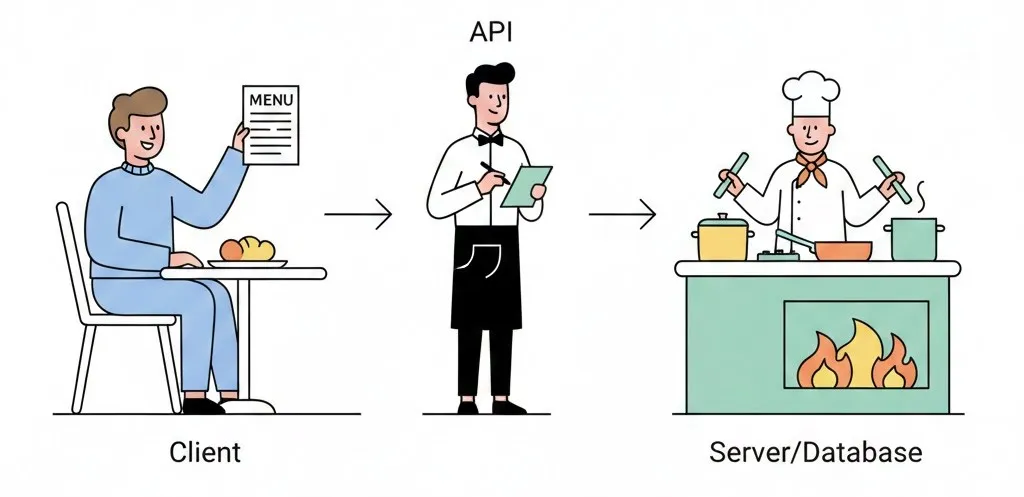
Think of a Restaurant as an analogy for API:
| Restaurant | API |
|---|---|
| Customer = Client | App/Website |
| Waiter = API | API |
| Kitchen = Server/Database | Server/Database |
| Menu = Documentation | API Documentation |
| Order food = Request | HTTP Request |
| Food served = Response | HTTP Response |
How it works:
- Customer reads menu → Client reads API Documentation
- Customer places order → Client sends HTTP Request
- Waiter sends order to kitchen → API sends request to Server
- Kitchen prepares food → Server processes/fetches data
- Waiter serves food → API sends HTTP Response back
0.2 Types of APIs#
| Type | Description | Examples |
|---|---|---|
| REST API | Uses HTTP Methods (GET, POST, PUT, DELETE) | /users, /products |
| GraphQL | Query exactly the data you need | Facebook API, GitHub API |
| SOAP | XML-based for Enterprise | Legacy banking systems |
| WebSocket | Real-time bidirectional | Chat, Stock trading |
0.3 Why Use APIs?#
- Separate Frontend and Backend - Develop independently
- Multi-platform Support - One API serves Web, Mobile, IoT
- Easy Integration - Connect with other services (Google, Facebook, Payment)
- Scalability - Easy to scale the system
0.4 Components of REST API#
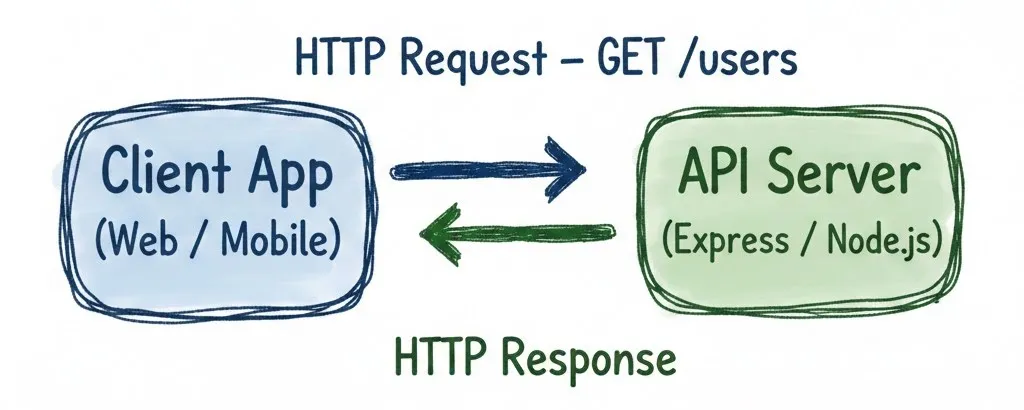
- Client - Requester (Browser, Mobile App, Postman)
- Request - HTTP request (Method + URL + Headers + Body)
- Server - Service provider (Express, Django, Laravel)
- Response - Result (Status Code + JSON Data)
1. Objectives#
Design and develop a RESTful API that supports CRUD operations for three related resource types:
- Users
- Products
- Orders
And develop APIs for nested resources to display all orders of a user and all products in an order.
2. URI Design Principles for RESTful API#
2.1 Use Nouns, Not Verbs
URI should represent “Resources” not “Actions”
✅ Correct:
/users- User resource/orders/123- Order resource with ID 123/products- Product resource
❌ Incorrect:
/getUsers- Uses a verb/createOrder- Uses a verb/deleteProduct- Uses a verb
Reason: HTTP Method (GET, POST, PUT, DELETE) already indicates the action
| HTTP Method | Example URI | Meaning |
|---|---|---|
| GET | /users | Get all users |
| GET | /users/123 | Get user with ID 123 |
| POST | /users | Create a new user |
| PUT | /users/123 | Update user with ID 123 |
| DELETE | /users/123 | Delete user with ID 123 |
2.2 Use Hierarchical Structure
Show resource relationships through the path
✅ Correct:
/users/123/orders→ All orders of user with ID 123/orders/456/items→ All items in order with ID 456/categories/10/products→ All products in category with ID 10
❌ Not Recommended:
/getUserOrder?userId=123→ Same data, but the above is cleaner and more RESTful
Hierarchical URI clearly shows “resource relationships”:
usersis the main resourceordersis a sub-resource that belongs to a specific user
2.3 Use Plural Nouns for Multiple Resources
✅ Correct:
/products→ Means multiple items/users→ Means multiple items/orders→ Means multiple items
❌ Incorrect:
/product→ Seems like only 1 item/user→ Seems like only 1 item
2.4 Use Query Strings for Filtering/Sorting
✅ Correct:
/products?sort=price&limit=10→ Sort by price, show 10 items/users?role=admin&active=true→ Filter users who are admin and active/orders?status=pending&date=2024-01-01→ Filter orders by status and date
2.5 Avoid Common Mistakes
❌ Things to Avoid:
- Using uppercase:
/Users→ Should use/users - Adding file extensions:
/users.json→ Should use/users - Using underscores:
/user_orders→ Should use/user-ordersor/users/123/orders
✅ Best Practices:
- Use all lowercase letters
- Use hyphen (-) instead of underscore (_)
- Use versioning at the beginning of URI:
/v1/users,/v2/products
3. HTTP Status Codes You Should Know#
When a Client sends an HTTP request to an API Server, it receives an HTTP Response with a Status Code (3-digit number) to indicate the result: ✅ Success, ❌ Failure, or ℹ️ Other Status
3.1 Common Status Codes
| Code | Category | Meaning | When to Use |
|---|---|---|---|
| 200 | OK | Success with data | GET, PUT successful |
| 201 | Created | Success, new resource created | POST successful |
| 204 | No Content | Success without data | DELETE successful |
| 400 | Bad Request | Invalid request | Incomplete or malformed data |
| 401 | Unauthorized | Not authenticated | Authentication required (e.g., token) |
| 403 | Forbidden | Access denied | Has token but no permission |
| 404 | Not Found | Requested resource not found | No data for specified ID |
| 409 | Conflict | Data conflict | e.g., duplicate email |
| 422 | Unprocessable Entity | Validation failed | Valid format but fails constraints |
| 500 | Server Error | Server error occurred | Unexpected error |
3.2 Status Code Category Summary
- ✅ 2xx → Success
- ℹ️ 3xx → Redirection
- ⚠️ 4xx → Client Error
- 🛠️ 5xx → Server Error
4. Getting Started with RESTful API Development using Node.js, Express#
4.1 Install Required Software#
- Node.js Node.js ↗ Download the LTS version
- Postman Postman Downloads ↗
4.2 Project Setup#
mkdir demo-api
cd demo-api
npm init -y
npm install express cors body-parser
code .Create index.js file
// Import required modules
const express = require('express');        // Framework for creating web server
const bodyParser = require('body-parser'); // JSON data parser from request body
const cors = require('cors');              // Allow access from other domains

// Create Express application
const app = express();
const port = 5000; // Define the port where server will run

// Install Middleware (middleware that runs before route handler)
app.use(cors());                    // Enable CORS for all routes
app.use(bodyParser.json());         // Parse JSON in request body to JavaScript object

// Main route - test if server is working
app.get('/', (req, res) => {
  res.status(200).send('Hello! RESTful API is ready');
});

// Start server and listen for requests
app.listen(port, () => {
  console.log(`Server running at http://localhost:${port}`);
});Code explanation:
- require() - Import required libraries
- express() - Create Express application instance
- app.use() - Install middleware that runs on every request
- app.get() - Define route for HTTP GET method
- res.status().send() - Send response with status code
- app.listen() - Start server and listen for requests
4.3 Start the Server#
node index.jsOpen your web browser to http://localhost:5000 and you will see “Hello! RESTful API is ready”
5. User Resource#
Sample User Data
let users = [
  {
    id: 1,
    fname: "Karn",
    lname: "Yong",
    username: "karn.yong",
    email: "karn.yong@melivecode.com",
    avatar: "https://www.melivecode.com/users/1.png"
  }, {
    id: 2,
    fname: "Parkpoom",
    lname: "Chaisiriprasert",
    username: "parkpoom",
    email: "parkpoom@melivecode.com",
    avatar: "https://www.melivecode.com/users/2.png"
  }
];Endpoints
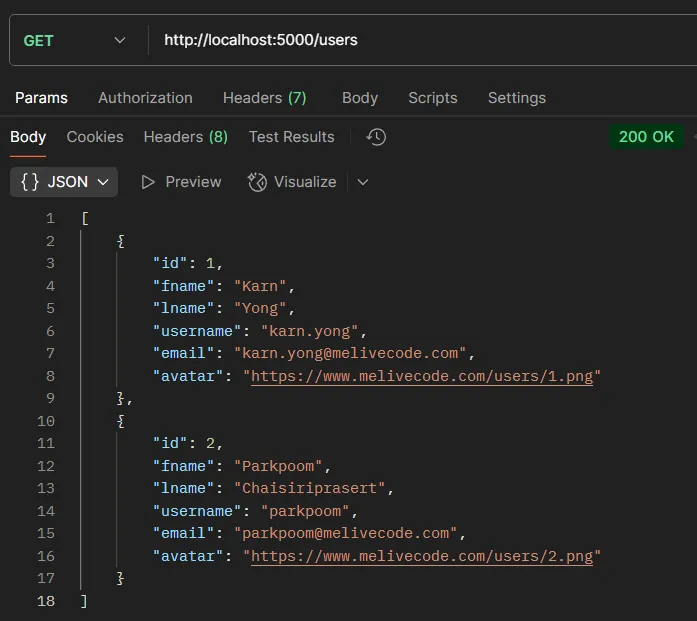
5.1. Read All Users#
app.get('/users', (req, res) => {
  res.status(200).json(users);
});Code explanation:
app.get('/users', ...)- Create a route for GET request at path/users(req, res) => {...}- Function that executes when a request comes inreq- Request object containing data from the clientres- Response object for sending data backres.status(200)- Set HTTP status code 200 (OK).json(users)- Send users data back in JSON format
Test with Postman:
- Method:
GET - URL:
http://localhost:5000/users - Headers: Not required
- Body: Not required
- Expected Result: All users list (Array)
5.2. Read One User#
app.get('/users/:id', (req, res) => {
  const id = parseInt(req.params.id);
  const user = users.find(u => u.id === id);

  if (!user) {
    return res.status(404).json({ message: 'User not found' });
  }

  res.status(200).json(user);
});Code explanation:
:id- URL parameter that accepts dynamic values (e.g.,/users/1,/users/123)req.params.id- Extract parameter value from URLparseInt()- Convert string to numberusers.find()- Find user that matches the condition (same id)if (!user)- Check case when data is not foundreturn- Stop function execution immediatelystatus(404)- HTTP status code for “Not Found”
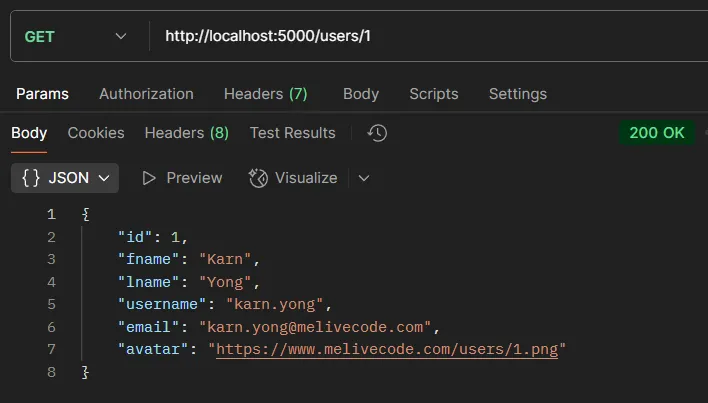
Test with Postman:
- Method:
GET - URL:
http://localhost:5000/users/1 - Headers: Not required
- Body: Not required
- Expected Result: User data with ID 1
5.3. Create User#
app.post('/users', (req, res) => {
  const newUser = req.body;
  users.push(newUser);
  res.status(201).json(newUser);
});Code explanation:
app.post()- Create a route for POST request (for creating new data)req.body- Data sent in request body (via bodyParser.json())users.push()- Add data to arraystatus(201)- HTTP status code for “Created” (successfully created)
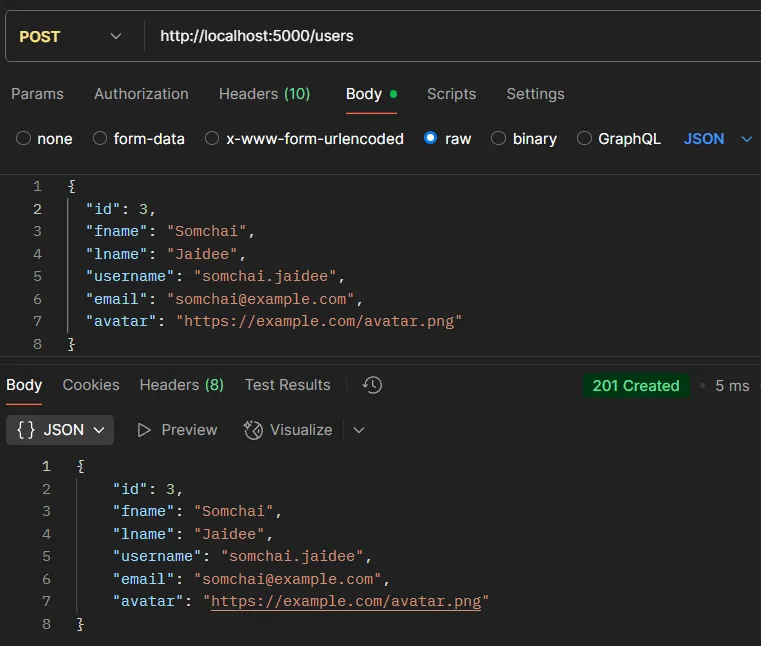
Test with Postman:
- Method:
POST - URL:
http://localhost:5000/users - Headers:
Content-Type: application/json - Body (JSON):
{
  "id": 3,
  "fname": "Somchai",
  "lname": "Jaidee",
  "username": "somchai.jaidee",
  "email": "somchai@example.com",
  "avatar": "https://example.com/avatar.png"
}- Expected Result: New user data with ID
5.4. Update User#
app.put('/users/:id', (req, res) => {
  const id = parseInt(req.params.id);
  const index = users.findIndex(u => u.id === id);

  if (index === -1) {
    return res.status(404).json({ message: 'User not found' });
  }

  // Update data by combining old and new data together
  users[index] = { ...users[index], ...req.body };
  res.status(200).json(users[index]);
});Code explanation:
app.put()- Create a route for PUT request (for updating data)findIndex()- Find index of element matching condition (returns -1 if not found){ ...users[index], ...req.body }- Object spread syntax...users[index]- Spread all old data...req.body- Spread new data (will overwrite old data with same name)
users[index] =- Update data in array at that index position
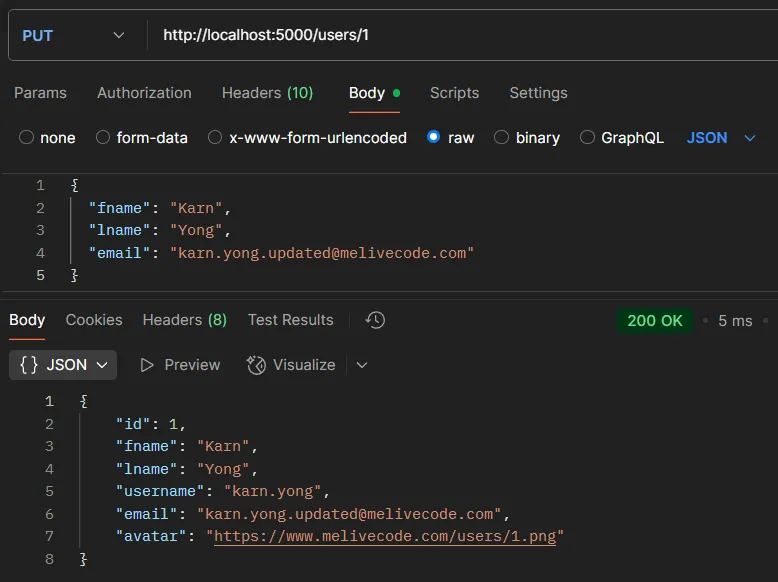
Test with Postman:
- Method:
PUT - URL:
http://localhost:5000/users/1 - Headers:
Content-Type: application/json - Body (JSON):
{
  "fname": "Karn",
  "lname": "Yong",
  "email": "karn.yong.updated@melivecode.com"
}- Expected Result: Updated user data
5.5. Delete User#
app.delete('/users/:id', (req, res) => {
  const id = parseInt(req.params.id);
  const index = users.findIndex(u => u.id === id);

  if (index === -1) {
    return res.status(404).json({ message: 'User not found' });
  }

  users.splice(index, 1);
  res.status(200).json({ message: `User with ID ${id} deleted successfully` });
});Code explanation:
app.delete()- Create a route for DELETE request (for deleting data)splice(index, 1)- Remove element from arrayindex- Position to start deleting1- Number of elements to delete (delete 1 item)
- Template literal -
${id}used to insert variable into string
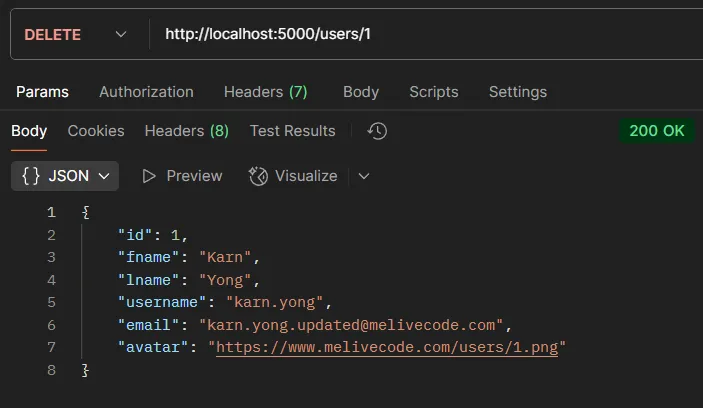
Test with Postman:
- Method:
DELETE - URL:
http://localhost:5000/users/1 - Headers: Not required
- Body: Not required
- Expected Result: Deletion confirmation message
6. Product Resource#
Sample Product Data
let products = [
  { id: 1, name: "Laptop", price: 39999 },
  { id: 2, name: "Smartphone", price: 19999 },
  { id: 3, name: "Monitor", price: 7999 }
];Endpoints
CRUD operations for products follow the same pattern as users
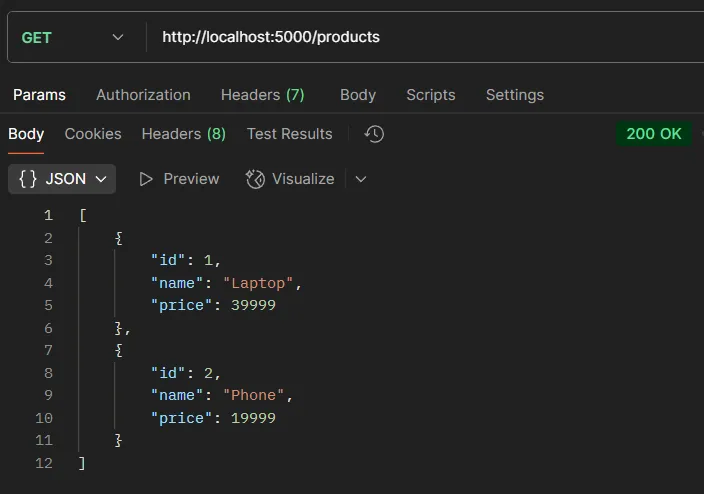
6.1. Read All Products#
app.get('/products', (req, res) => {
  res.status(200).json(products);
});Test with Postman:
- Method:
GET - URL:
http://localhost:5000/products - Headers: Not required
- Body: Not required
- Expected Result: All products list (Array)
6.2. Read One Product#
app.get('/products/:id', (req, res) => {
  const id = parseInt(req.params.id);
  const product = products.find(p => p.id === id);

  if (!product) {
    return res.status(404).json({ message: 'Product not found' });
  }

  res.status(200).json(product);
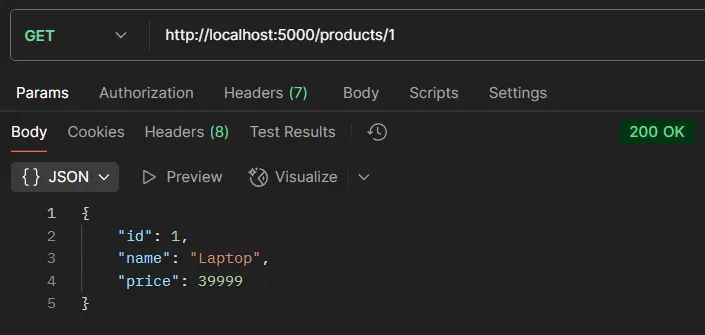
});Test with Postman:
- Method: GET
- URL:
http://localhost:5000/products/1 - Headers:
Content-Type: application/json - Expected Result: Product data with ID 1 (Status 200)
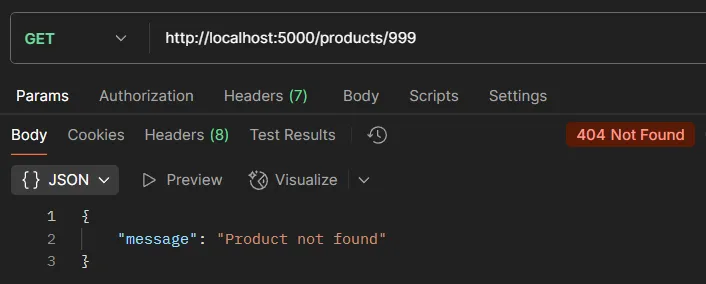
- Test Error: Use URL
http://localhost:5000/products/999to test case when product not found (Status 404)
6.3. Create Product#
app.post('/products', (req, res) => {
  const newProduct = req.body;
  products.push(newProduct);
  res.status(201).json(newProduct);
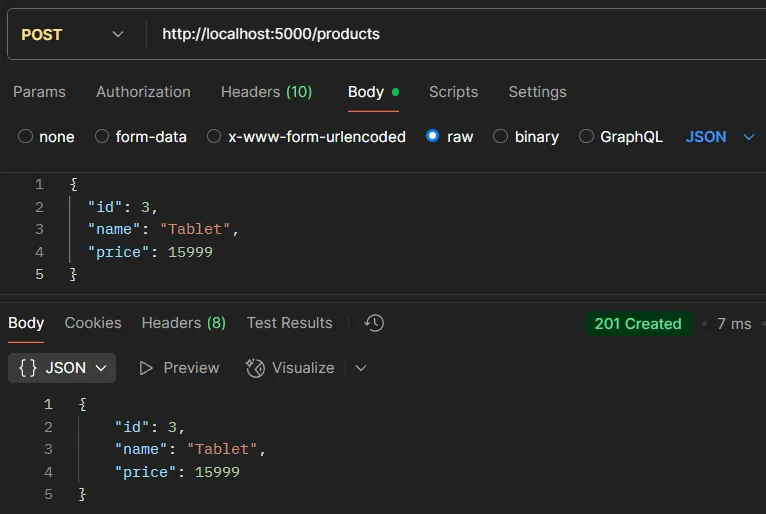
});Test with Postman:
- Method: POST
- URL:
http://localhost:5000/products - Headers:
Content-Type: application/json - Body (JSON):
{
  "id": 4,
  "name": "Tablet",
  "price": 15999
}- Expected Result: New product with ID (Status 201)
- Test Error: Send Body as
{}to test invalid data (Status 400)
6.4. Update Product#
app.put('/products/:id', (req, res) => {
  const id = parseInt(req.params.id);
  const index = products.findIndex(p => p.id === id);

  if (index === -1) {
    return res.status(404).json({ message: 'Product not found' });
  }

  products[index] = { ...products[index], ...req.body };
  res.status(200).json(products[index]);
});Test with Postman:
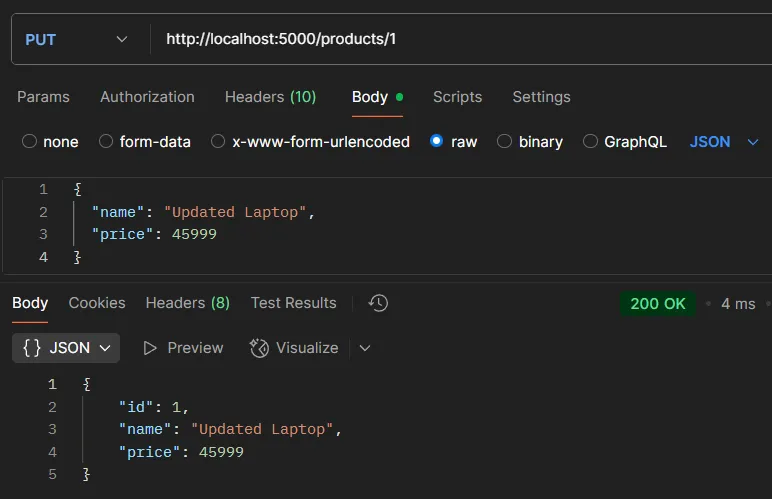
- Method: PUT
- URL:
http://localhost:5000/products/3 - Headers:
Content-Type: application/json - Body (JSON):
{
  "name": "Updated Laptop",
  "price": 45999
}- Expected Result: Updated product data (Status 200)
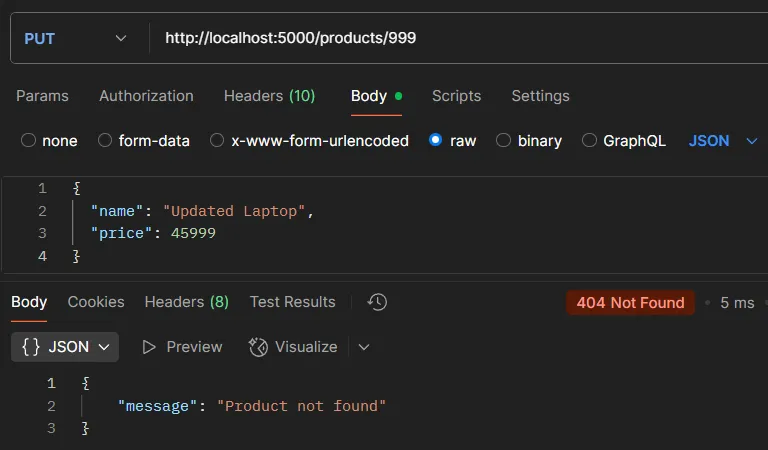
- Test Error: Use URL
http://localhost:5000/products/999to test case when product not found (Status 404)
6.5. Delete Product#
app.delete('/products/:id', (req, res) => {
  const id = parseInt(req.params.id);
  const index = products.findIndex(p => p.id === id);

  if (index === -1) {
    return res.status(404).json({ message: 'Product not found' });
  }

  products.splice(index, 1);
  res.status(200).json({ message: `Product ${id} deleted successfully` });
});Test with Postman:
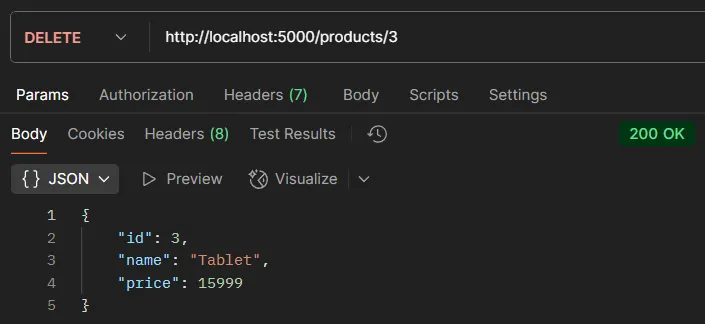
- Method: DELETE
- URL:
http://localhost:5000/products/3 - Headers:
Content-Type: application/json - Body: Not required
- Expected Result: Deletion confirmation message (Status 200)
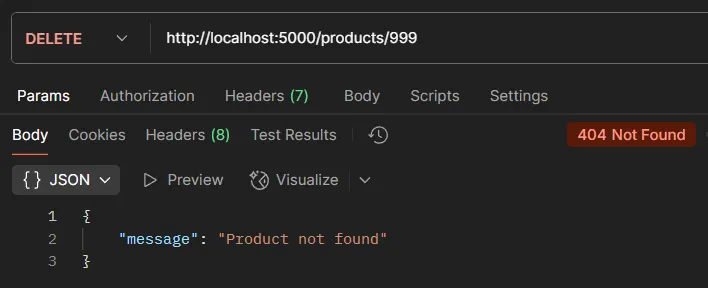
- Test Error: Use URL
http://localhost:5000/products/999to test case when product not found (Status 404)
7. Order Resource#
Sample Order Data
let orders = [
  { id: 1, userId: 1, productIds: [1, 2] },
  { id: 2, userId: 2, productIds: [2] },
  { id: 3, userId: 1, productIds: [2, 3] }
];Endpoints
7.1. Read All Orders#
app.get('/orders', (req, res) => {
  // Create order data with complete details
  const detailedOrders = orders.map(order => {
    // Find user who placed the order
    const user = users.find(u => u.id === order.userId);

    // Find all products in the order
    const productsInOrder = order.productIds.map(pid =>
      products.find(p => p.id === pid)
    );

    // Return reformatted data
    return {
      id: order.id,
      user: user,
      products: productsInOrder
    };
  });

  res.status(200).json(detailedOrders);
});Code explanation:
orders.map()- Transform array of orders into new formatusers.find(u => u.id === order.userId)- Find user from userId in orderorder.productIds.map()- Loop through all productIdsproducts.find(p => p.id === pid)- Find product data from each productIdreturn { ... }- Create new object with complete data
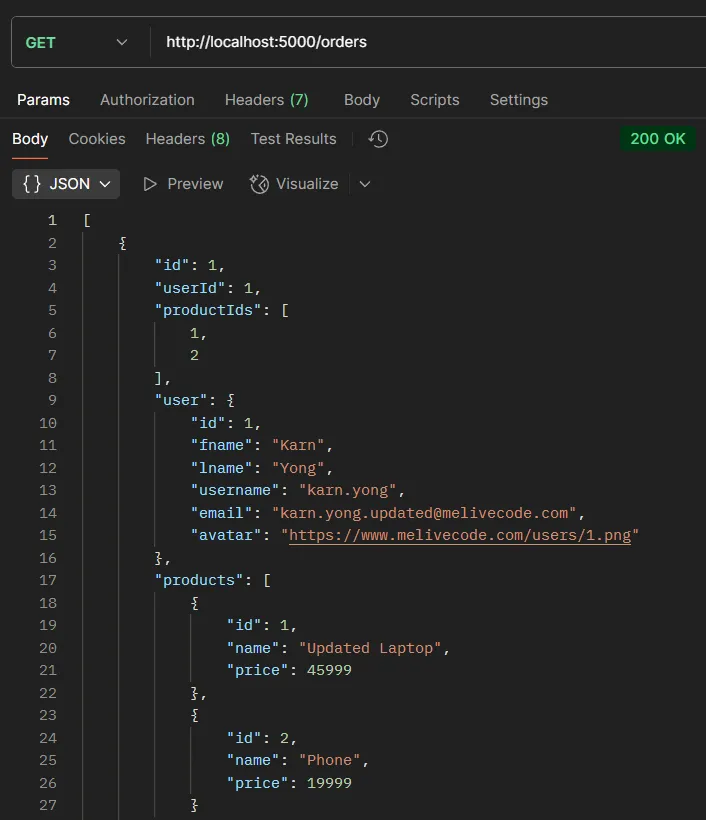
Test with Postman:
- Method: GET
- URL:
http://localhost:5000/orders - Headers:
Content-Type: application/json - Body: Not required
- Expected Result: All orders list with user and product details (Status 200)
7.2. Read One Order#
app.get('/orders/:id', (req, res) => {
  const id = parseInt(req.params.id);
  const order = orders.find(o => o.id === id);

  if (!order) {
    return res.status(404).json({ message: 'Order not found' });
  }

  const user = users.find(u => u.id === order.userId);
  const productsInOrder = order.productIds.map(pid =>
    products.find(p => p.id === pid)
  );

  res.status(200).json({
    id: order.id,
    user: user,
    products: productsInOrder
  });
});Test with Postman:
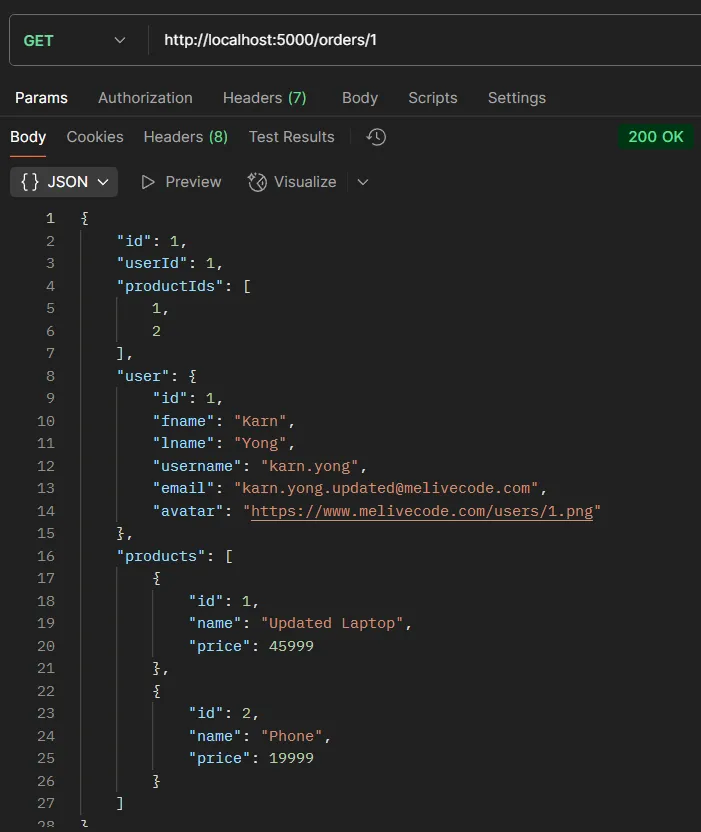
- Method: GET
- URL:
http://localhost:5000/orders/1 - Headers:
Content-Type: application/json - Body: Not required
- Expected Result: Order data ID 1 with user and product details (Status 200)
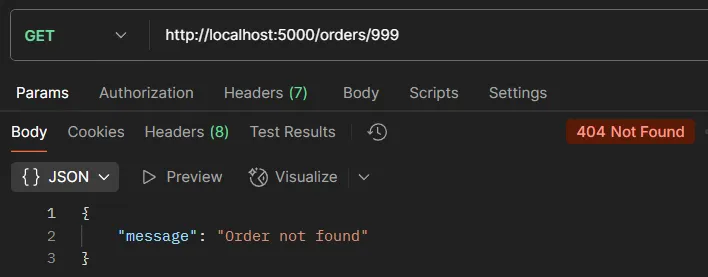
- Test Error: Use URL
http://localhost:5000/orders/999to test case when order not found (Status 404)
7.3. Create Order#
app.post('/orders', (req, res) => {
  const newOrder = req.body;

  orders.push(newOrder);
  res.status(201).json(newOrder);
});Test with Postman:
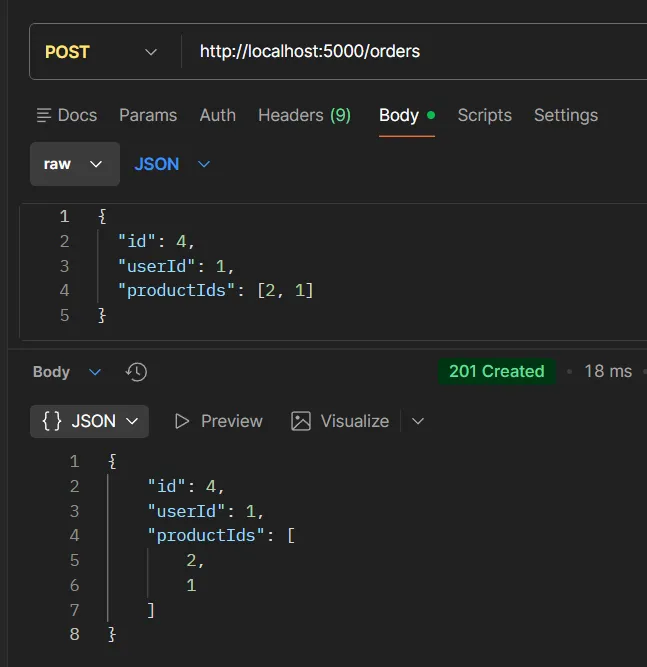
- Method: POST
- URL:
http://localhost:5000/orders - Headers:
Content-Type: application/json - Body (JSON):
{
  "id": 4,
  "userId": 1,
  "productIds": [2, 1]
}- Expected Result: New order with ID (Status 201)
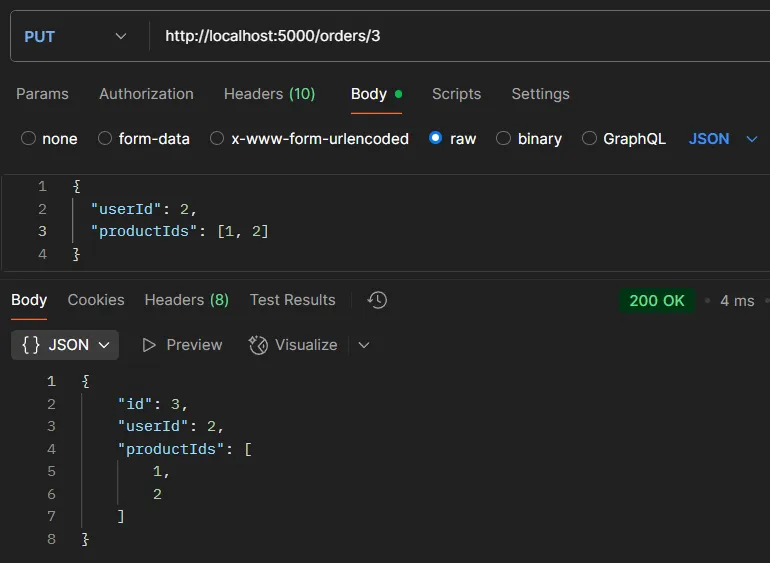
7.4. Update Order#
app.put('/orders/:id', (req, res) => {
  const id = parseInt(req.params.id);
  const index = orders.findIndex(o => o.id === id);

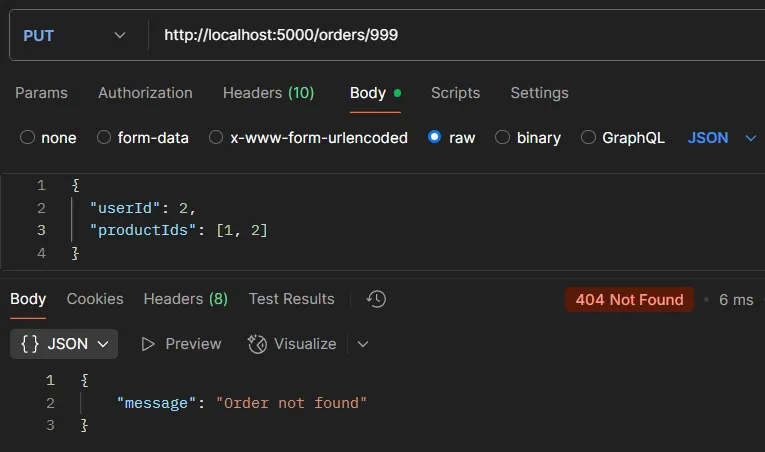
  if (index === -1) {
    return res.status(404).json({ message: 'Order not found' });
  }

  orders[index] = { ...orders[index], ...req.body };
  res.status(200).json(orders[index]);
});Test with Postman:
- Method: PUT
- URL:
http://localhost:5000/orders/3 - Headers:
Content-Type: application/json - Body (JSON):
{
  "userId": 2,
  "productIds": [1, 2]
}- Expected Result: Updated order data (Status 200)
- Test Error: Use URL
http://localhost:5000/orders/999to test case when order not found (Status 404)
7.5. Delete Order#
app.delete('/orders/:id', (req, res) => {
  const id = parseInt(req.params.id);
  const index = orders.findIndex(o => o.id === id);

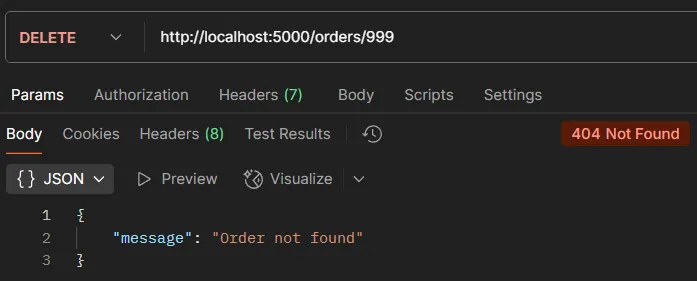
  if (index === -1) {
    return res.status(404).json({ message: 'Order not found' });
  }

  orders.splice(index, 1);
  res.status(200).json({ message: `Order ${id} deleted successfully` });
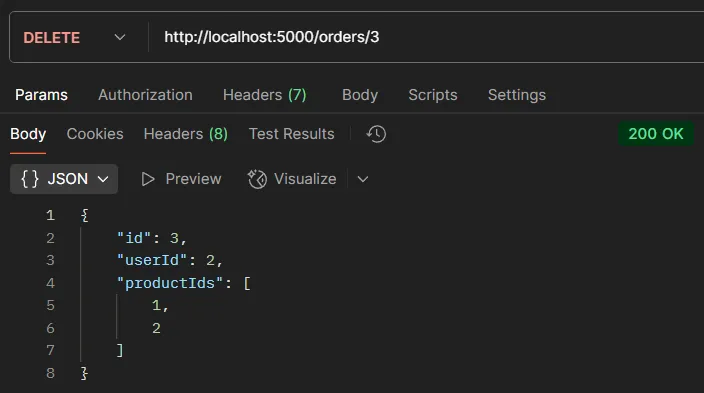
});Test with Postman:
- Method: DELETE
- URL:
http://localhost:5000/orders/3 - Headers:
Content-Type: application/json - Body: Not required
- Expected Result: Deletion confirmation message (Status 200)
- Test Error: Use URL
http://localhost:5000/orders/999to test case when order not found (Status 404)
8. Nested Resources#
8.1. Get Orders by User#
app.get('/users/:id/orders', (req, res) => {
  const userId = parseInt(req.params.id);
  const user = users.find(u => u.id === userId);

  if (!user) {
    return res.status(404).json({ message: 'User not found' });
  }

  // Filter orders that belong to this user only
  const userOrders = orders.filter(order => order.userId === userId);
  res.status(200).json(userOrders);
});Code explanation:
- Nested Resource Pattern -
/users/:id/ordersshows the relationship that “orders belong to user” filter()- Filter data by condition (returns new array with only matching data)order.userId === userId- Condition for filtering (orders with matching userId)
Test with Postman:
- Method: GET
- URL:
http://localhost:5000/users/1/orders - Headers:
Content-Type: application/json - Body: Not required
- Expected Result: Orders list of user ID 1 (Status 200)
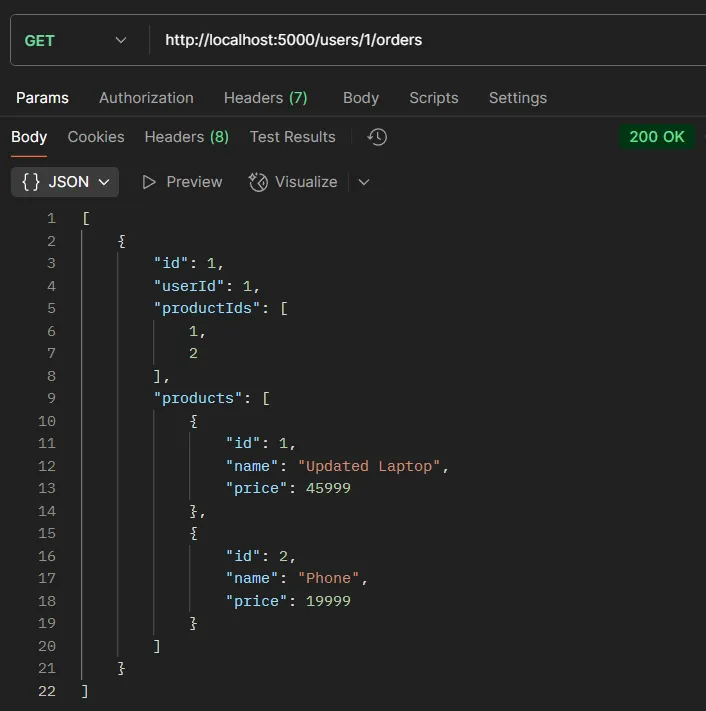
- Test Error: Use URL
http://localhost:5000/users/999/ordersto test case when user not found (Status 404)
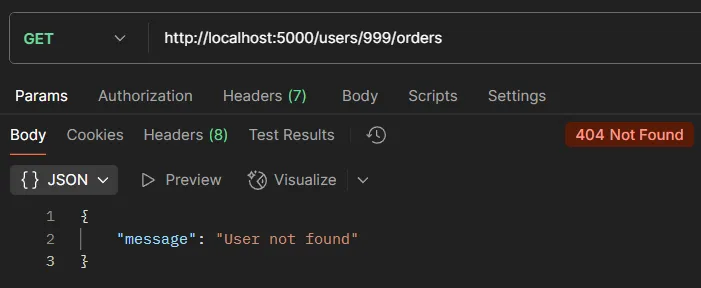
8.2. Get Products in an Order#
app.get('/orders/:id/products', (req, res) => {
  const orderId = parseInt(req.params.id);
  const order = orders.find(o => o.id === orderId);

  if (!order) {
    return res.status(404).json({ message: 'Order not found' });
  }

  const productsInOrder = order.productIds.map(pid =>
    products.find(p => p.id === pid)
  );

  res.status(200).json(productsInOrder);
});Test with Postman:
- Method: GET
- URL:
http://localhost:5000/orders/1/products - Headers:
Content-Type: application/json - Body: Not required
- Expected Result: Products list in order ID 1 (Status 200)
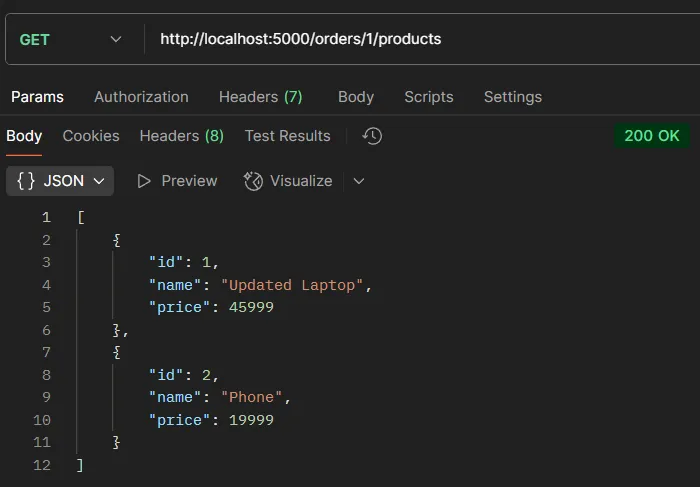
- Test Error: Use URL
http://localhost:5000/orders/999/productsto test case when order not found (Status 404)
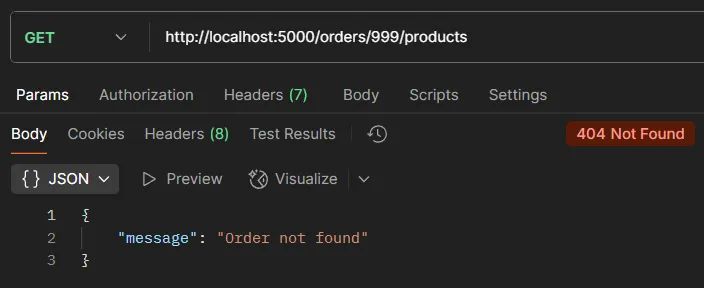
9. Summary#
What you learned from this content:
- URI Design Principles following REST standards
- API Creation with Node.js and Express
- CRUD Operations for multiple resource types
- Nested Resources for related data
- API Testing with Postman
Benefits of RESTful API Design
- Easy to Understand - Clear and standard URIs
- Flexibility - Easy to extend
- Separation of Concerns - Client and Server work independently
- Reusability - Single API supports multiple applications