สร้าง RESTful API + OpenAPI Document
เรียนรู้วิธีพัฒนา RESTful API พร้อมสร้าง API Documentation ด้วย OpenAPI Specification และ Swagger UI ด้วย Express, TypeScript และ MySQL
บทความนี้จะแนะนำการพัฒนา RESTful API พร้อมสร้าง API Documentation ด้วย OpenAPI Specification และ Swagger UI โดยใช้ Express.js, TypeScript, และ MySQL
1. วัตถุประสงค์#
- เรียนรู้การพัฒนา RESTful API ด้วย Express + TypeScript
- เข้าใจการเชื่อมต่อ MySQL Database ด้วย CAMPP
- สร้าง API Documentation ด้วย OpenAPI Specification
- ติดตั้งและใช้งาน Swagger UI สำหรับทดสอบ API
- เข้าใจการสร้าง API ที่มี Type Safety และ Input Validation ครบถ้วน
2. เครื่องมือที่ใช้#
2.1 Express.js#
เฟรมเวิร์กสำหรับสร้าง Web Application และ API บน Node.js
2.2 TypeScript#
ภาษาที่เพิ่ม Type System ให้ JavaScript ช่วยลดข้อผิดพลาดและทำให้โค้ดมีความปลอดภัยมากขึ้น
2.3 MySQL + mysql2#
ฐานข้อมูลเชิงสัมพันธ์ที่นิยมใช้ และ library สำหรับเชื่อมต่อ MySQL บน Node.js
2.4 CAMPP#
Local Web Development Stack ที่รวม Caddy, PHP, MySQL และ phpMyAdmin ไว้ด้วยกัน เหมาะสำหรับการพัฒนาในเครื่อง
2.5 OpenAPI (Swagger)#
OpenAPI คืออะไร?
OpenAPI (เดิมชื่อ Swagger) เป็นมาตรฐานสากลสำหรับอธิบาย RESTful API ที่เป็นที่ยอมรับทั่วโลก ช่วยให้นักพัฒนาและผู้ใช้เข้าใจและใช้งาน API ได้ง่ายขึ้น
ข้อดีของ OpenAPI:
- Standardization - ใช้รูปแบบมาตรฐานเดียวกันทั่วโลก
- Documentation - สร้าง API docs ได้อัตโนมัติ
- Testing - ทดสอบ API ได้โดยตรงใน Swagger UI
- Client Generation - สร้าง client libraries ได้อัตโนมัติ
- Team Collaboration - ช่วยให้ทีมงานเข้าใจ API ได้ตรงกัน
โครงสร้าง OpenAPI Specification:
info- ข้อมูลทั่วไปของ API (ชื่อ, เวอร์ชัน, คำอธิบาย)servers- รายการ server ที่ API ทำงานpaths- endpoints และ methods (GET, POST, PUT, DELETE)components.schemas- นิยาม data modelscomponents.parameters- parameters ที่ใช้ซ้ำได้tags- กลุ่ม endpoints
2.6 Swagger UI#
เครื่องมือสำหรับแสดง API Documentation แบบ Interactive ให้ผู้ใช้ทดสอบ API ได้โดยตรง
4. การตั้งค่าโปรเจค#
4.1 สร้างโปรเจคใหม่#
mkdir express-typescript-openapi
cd express-typescript-openapi
npm init -y4.2 ติดตั้ง Dependencies#
# Production Dependencies
npm install express cors mysql2 swagger-ui-express

# Development Dependencies
npm install -D typescript @types/node @types/express @types/cors ts-node nodemon
npm install -D @types/swagger-ui-expressคำอธิบาย Package:
| Package | วัตถุประสงค์ |
|---|---|
express | Web Framework |
cors | Cross-Origin Resource Sharing |
mysql2 | MySQL Driver สำหรับ Node.js |
swagger-ui-express | Swagger UI Middleware สำหรับ Express |
typescript | TypeScript Compiler |
@types/node | Type definitions สำหรับ Node.js |
@types/express | Type definitions สำหรับ Express |
@types/cors | Type definitions สำหรับ CORS |
@types/swagger-ui-express | Type definitions สำหรับ Swagger UI |
ts-node | รัน TypeScript โดยตรง |
nodemon | Auto-restart เมื่อมีการเปลี่ยนแปลงไฟล์ |
4.3 สร้างไฟล์ tsconfig.json#
{
  "compilerOptions": {
    "target": "ES2020",
    "module": "commonjs",
    "lib": ["ES2020"],
    "outDir": "./dist",
    "rootDir": "./src",
    "strict": true,
    "skipLibCheck": true,
    "forceConsistentCasingInFileNames": true,
    "resolveJsonModule": true
  },
  "include": ["src/**/*"],
  "exclude": ["node_modules"]
}คำอธิบาย:
| ตัวเลือก | ความหมาย |
|---|---|
target | ECMAScript version ที่จะ compile เป็น (ES2020 รองรับฟีเจอร์ใหม่ๆ) |
module | ระบบ module ที่จะใช้ (commonjs สำหรับ Node.js) |
lib | Library definitions ที่จะรวมในการ compile |
outDir | โฟลเดอร์ที่เก็บไฟล์ที่ compile แล้ว |
rootDir | โฟลเดอร์ต้นทางของไฟล์ TypeScript |
strict | เปิดใช้งาน strict mode (ตรวจสอบ types อย่างเข้มงวด) |
skipLibCheck | ข้ามการตรวจสอบ type definitions ใน node_modules (เพิ่มความเร็ว) |
forceConsistentCasingInFileNames | บังคับใช้ชื่อไฟล์ที่มี case สอดคล้องกัน |
resolveJsonModule | อนุญาตให้ import ไฟล์ .json ได้ |
include | ไฟล์/โฟลเดอร์ที่จะ compile |
exclude | ไฟล์/โฟลเดอร์ที่จะไม่ compile |
4.4 ตั้งค่า NPM Scripts#
เพิ่มใน package.json:
{
  "scripts": {
    "dev": "nodemon src/index.ts",
    "build": "tsc",
    "start": "node dist/index.js"
  }
}หมายเหตุ:
nodemonจะรัน TypeScript ผ่านts-nodeและ restart อัตโนมัติเมื่อมีการเปลี่ยนแปลงไฟล์
5. โครงสร้างโปรเจค#
express-typescript-openapi/
├── src/
│   ├── config/
│   │   └── database.ts
│   ├── validators/
│   │   └── validator.ts
│   ├── routes/
│   │   └── users.route.ts
│   ├── index.ts
│   └── openapi.ts
├── package.json
└── tsconfig.json3. การตั้งค่าฐานข้อมูล MySQL ด้วย CAMPP#
3.1 ติดตั้งและเริ่มต้น CAMPP#
CAMPP เป็น Local Web Development Stack ที่รวม Caddy, PHP, MySQL และ phpMyAdmin ไว้ด้วยกัน สามารถดาวน์โหลดได้จาก https://campp.melivecode.com/ ↗
ขั้นตอนการติดตั้ง:
- ดาวน์โหลด CAMPP จากเว็บไซต์
- ติดตั้งตามประเภทระบบปฏิบัติการที่ใช้อยู่
- เปิด CAMPP และกด Start Caddy, PHP, และ MySQL
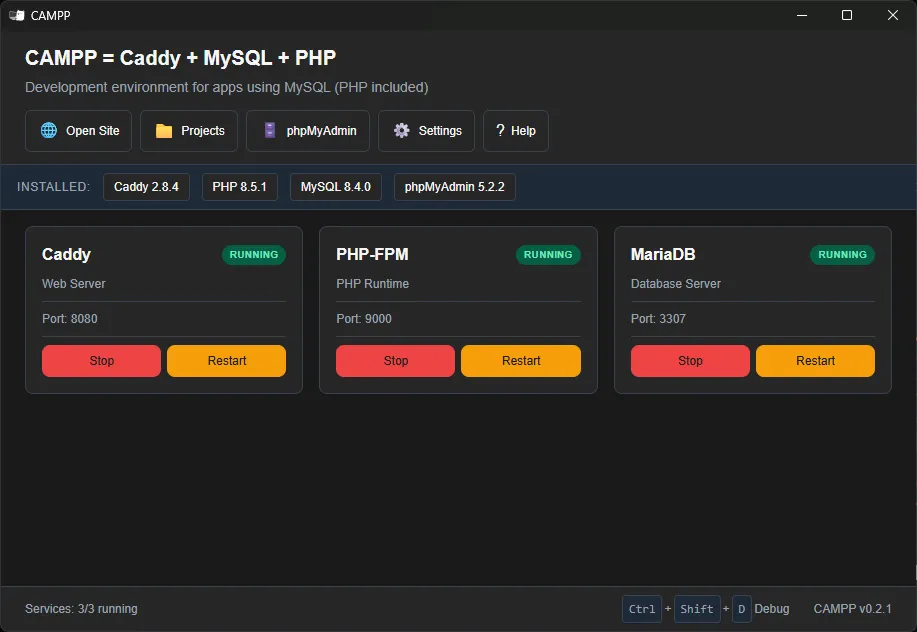
ข้อมูลการเชื่อมต่อ MySQL เริ่มต้นของ CAMPP:
| การตั้งค่า | ค่า |
|---|---|
| Host | localhost |
| Port | 3307 (ไม่ใช่ 3306 เพื่อหลีกเลี่ยงความขัดแย้ง) |
| Username | root |
| Password | (ตามที่ระบุใน CAMPP) |
หมายเหตุ: CAMPP ใช้พอร์ต 3307 สำหรับ MySQL เพื่อหลีกเลี่ยงความขัดแย้งกับบริการ MySQL อื่นที่อาจทำงานอยู่บนเครื่อง
3.2 สร้างฐานข้อมูล#
เข้าถึง phpMyAdmin ผ่าน CAMPP:
- กดปุ่ม phpMyAdmin ที่ Dashboard ของ CAMPP
- จะเปิด http://localhost:8080/phpmyadmin ↗ ขึ้นมา
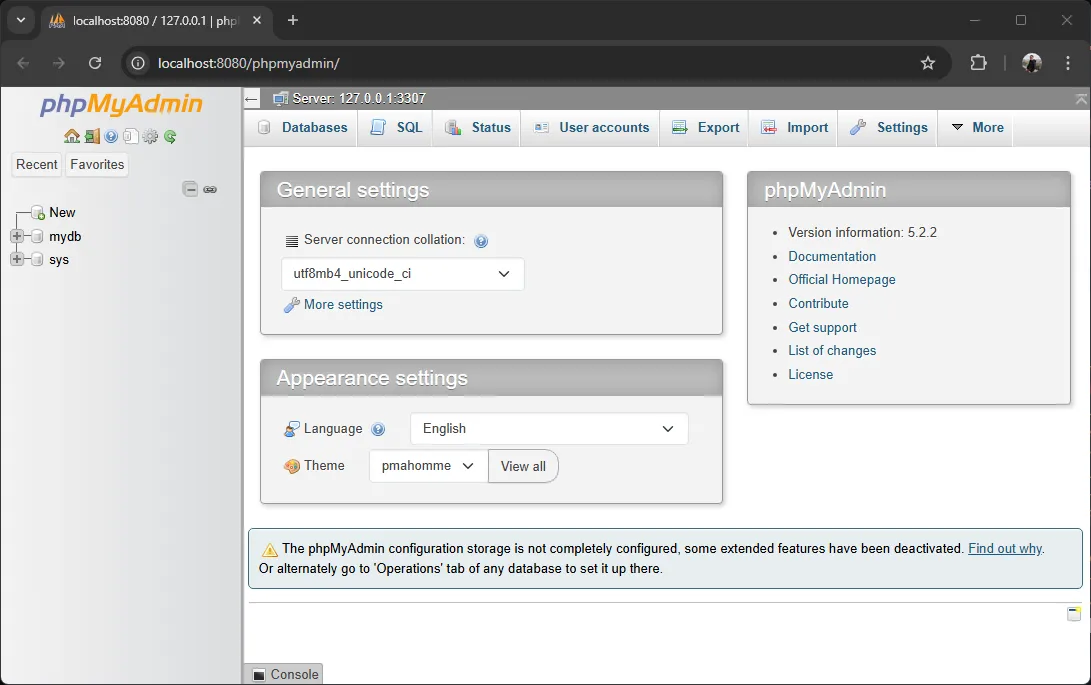
สร้างฐานข้อมูลใหม่:
- คลิกที่ New ใน phpMyAdmin
- ตั้งชื่อฐานข้อมูล:
test_db - คลิก Create
3.3 สร้างตารางด้วย SQL#
ใน phpMyAdmin เลือกฐานข้อมูล test_db แล้วคลิกที่ SQL วางคำสั่ง SQL ต่อไปนี้:
-- สร้างตาราง Users
CREATE TABLE users (
  id INT AUTO_INCREMENT PRIMARY KEY,
  fname VARCHAR(255) NOT NULL,
  lname VARCHAR(255) NOT NULL,
  username VARCHAR(255) NOT NULL UNIQUE,
  email VARCHAR(255) NOT NULL UNIQUE,
  avatar VARCHAR(500),
  role VARCHAR(50) DEFAULT 'user',
  is_active BOOLEAN DEFAULT TRUE,
  created_at TIMESTAMP DEFAULT CURRENT_TIMESTAMP
);คลิก Go เพื่อสร้างตาราง
3.4 เพิ่มข้อมูลตัวอย่าง#
-- เพิ่มข้อมูลตัวอย่าง
INSERT INTO users (fname, lname, username, email, avatar, role, is_active) VALUES
('Karn', 'Yong', 'karn.yong', 'karn@example.com', 'https://www.melivecode.com/users/1.png', 'user', TRUE),
('Ivy', 'Cal', 'ivy.cal', 'ivy@example.com', 'https://www.melivecode.com/users/2.png', 'admin', TRUE),
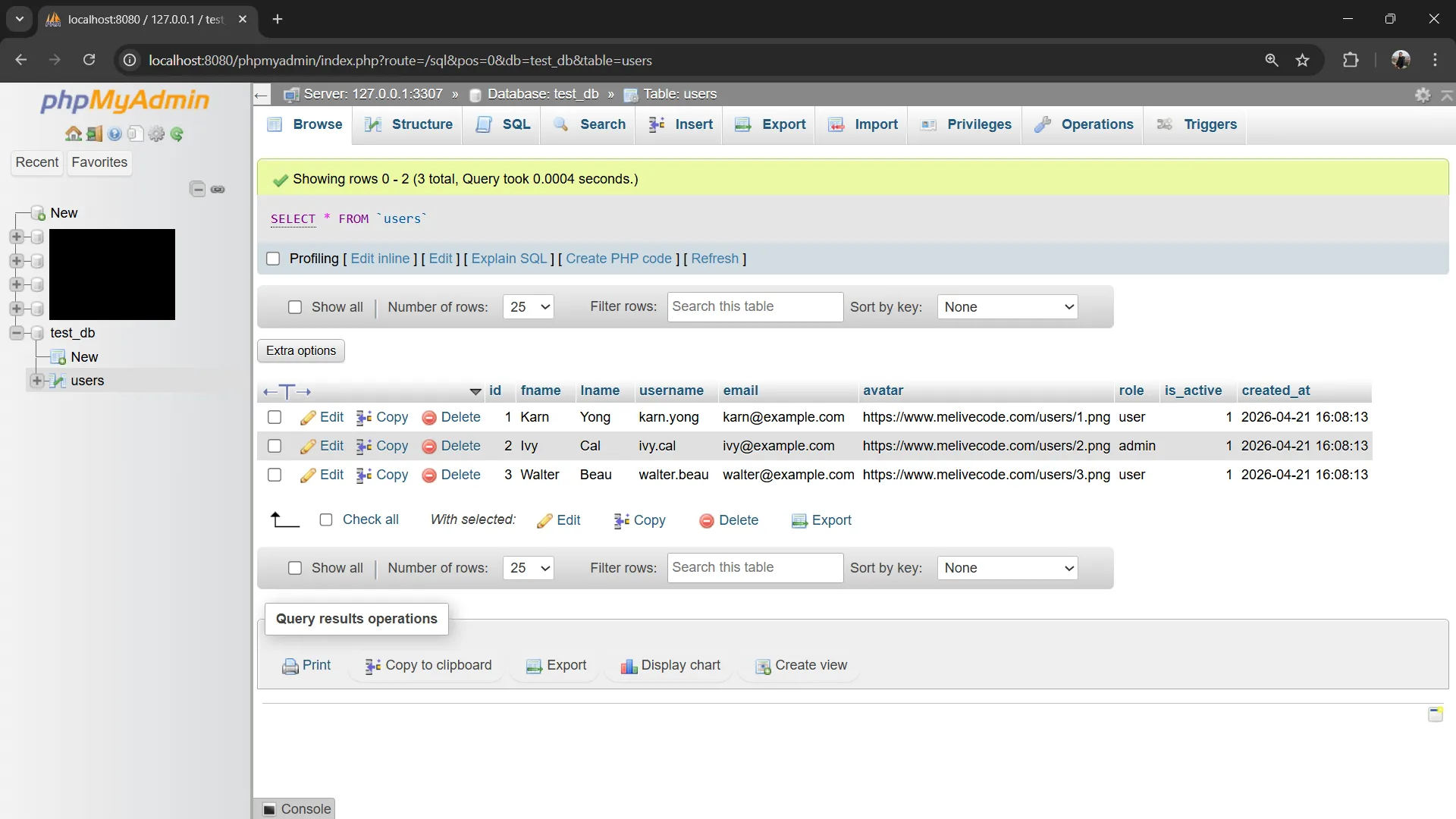
('Walter', 'Beau', 'walter.beau', 'walter@example.com', 'https://www.melivecode.com/users/3.png', 'user', TRUE);หลังจากคลิก Go คุณจะเห็นข้อมูลที่เพิ่มเข้าไปในตาราง:
3.5 สร้าง Database Config#
สร้างไฟล์ src/config/database.ts:
import mysql, { PoolOptions } from 'mysql2/promise';

const access: PoolOptions = {
  host: 'localhost',
  port: 3307,          // CAMPP ใช้พอร์ต 3307
  user: 'root',
  password: '',        // CAMPP default ไม่มี password
  database: 'test_db',
  waitForConnections: true,
  connectionLimit: 10,
  queueLimit: 0
};

export const pool = mysql.createPool(access);

// Helper function สำหรับ query
export async function query(sql: string, params?: any[]) {
  const [rows] = await pool.execute(sql, params);
  return rows;
}คำอธิบาย:
| ตัวเลือก | ความหมาย |
|---|---|
host | ที่อยู่เซิร์ฟเวอร์ MySQL (localhost สำหรับ local) |
port | พอร์ต MySQL (CAMPP ใช้ 3307 ไม่ใช่ 3306) |
user | ชื่อผู้ใช้ MySQL |
password | รหัสผ่าน MySQL |
database | ชื่อฐานข้อมูลที่ต้องการเชื่อมต่อ |
waitForConnections | รอให้มี connection ว่างเมื่อ pool เต็ม |
connectionLimit | จำนวน connection สูงสุดใน pool |
queueLimit | จำนวน request ที่รอในคิว (0 = ไม่จำกัด) |
หมายเหตุ: การใช้ Connection Pool ช่วยให้ไม่ต้องเปิด/ปิด connection ใหม่ทุกครั้ง ซึ่งช่วยเพิ่มประสิทธิภาพการทำงาน
6. สร้าง TypeScript Types#
สร้างไฟล์ src/types/user.ts:
// User Type สำหรับกำหนดรูปแบบข้อมูล
export interface User {
  id?: number;
  fname: string;
  lname: string;
  username: string;
  email: string;
  avatar?: string;
  role: 'user' | 'admin';
  isActive: boolean;
  created_at?: Date;
}

// Type สำหรับการสร้าง User ใหม่ (ไม่มี id)
export type CreateUser = Omit<User, 'id' | 'created_at'> & {
  avatar?: string;
  role?: 'user' | 'admin';
  isActive?: boolean;
};

// Type สำหรับการอัปเดต User (ทุก field ไม่บังคับ)
export type UpdateUser = Partial<Omit<User, 'id' | 'created_at'>> & {
  id: number;
};

// Type สำหรับ Query Parameters
export interface UserQuery {
  page?: number;
  limit?: number;
  search?: string;
}คำอธิบาย:
| Type Utility | ความหมาย |
|---|---|
interface | กำหนดรูปแบบข้อมูลที่มี properties |
Omit<Type, Keys> | สร้าง type ใหม่โดยเอาบาง properties ออก |
Partial<Type> | ทำทุก properties ให้ไม่บังคับ (optional) |
& (Intersection) | รวม 2 หรือมากกว่า types เข้าด้วยกัน |
? | บ่งบอกว่า property นั้นไม่บังคับ |
| ` | ` (Union) |
Types ที่สร้าง:
| Type | ใช้สำหรับ | คำอธิบาย |
|---|---|---|
User | ข้อมูล User ทั่วไป | มีทุก field รวม id และ created_at |
CreateUser | การสร้าง User ใหม่ | ไม่มี id และ created_at (สร้างอัตโนมัติ) |
UpdateUser | การอัปเดต User | ทุก field ไม่บังคับ มี id สำหรับระบุตัวตน |
UserQuery | Query Parameters | สำหรับ pagination และ search |
7. สร้าง Validation Middleware#
สร้างไฟล์ src/validators/validator.ts:
import { Request, Response, NextFunction, RequestHandler } from 'express';

// ฟังก์ชันตรวจสอบ Email
const isValidEmail = (email: string): boolean => {
  const emailRegex = /^[^\s@]+@[^\s@]+\.[^\s@]+$/;
  return emailRegex.test(email);
};

// ฟังก์ชันตรวจสอบ Username
const isValidUsername = (username: string): boolean => {
  const usernameRegex = /^[a-zA-Z0-9_]{3,50}$/;
  return usernameRegex.test(username);
};

// Validation Middleware สำหรับ Request Body
export const validateCreateUser = (): RequestHandler => {
  return (req: Request, res: Response, next: NextFunction) => {
    const { fname, lname, username, email, avatar, role, isActive } = req.body;
    const errors: string[] = [];

    // ตรวจสอบ fname
    if (!fname || typeof fname !== 'string' || fname.trim().length === 0) {
      errors.push('First name is required');
    } else if (fname.length > 100) {
      errors.push('First name must not exceed 100 characters');
    }

    // ตรวจสอบ lname
    if (!lname || typeof lname !== 'string' || lname.trim().length === 0) {
      errors.push('Last name is required');
    } else if (lname.length > 100) {
      errors.push('Last name must not exceed 100 characters');
    }

    // ตรวจสอบ username
    if (!username || typeof username !== 'string') {
      errors.push('Username is required');
    } else if (!isValidUsername(username)) {
      errors.push('Username must be 3-50 characters and contain only letters, numbers, and underscores');
    }

    // ตรวจสอบ email
    if (!email || typeof email !== 'string') {
      errors.push('Email is required');
    } else if (!isValidEmail(email)) {
      errors.push('Invalid email format');
    }

    // ตรวจสอบ avatar (ถ้ามี)
    if (avatar !== undefined && typeof avatar !== 'string') {
      errors.push('Avatar must be a string');
    }

    // ตรวจสอบ role (ถ้ามี)
    if (role !== undefined && !['user', 'admin'].includes(role)) {
      errors.push('Role must be either "user" or "admin"');
    }

    // ตรวจสอบ isActive (ถ้ามี)
    if (isActive !== undefined && typeof isActive !== 'boolean') {
      errors.push('isActive must be a boolean');
    }

    if (errors.length > 0) {
      return res.status(400).json({
        success: false,
        errors: errors.map(msg => ({ message: msg }))
      });
    }

    next();
  };
};

// Validation Middleware สำหรับ Update User
export const validateUpdateUser = (): RequestHandler => {
  return (req: Request, res: Response, next: NextFunction) => {
    const { fname, lname, username, email, avatar, role, isActive } = req.body;
    const errors: string[] = [];

    // ตรวจสอบ fname (ถ้ามี)
    if (fname !== undefined) {
      if (typeof fname !== 'string' || fname.trim().length === 0) {
        errors.push('First name must not be empty');
      } else if (fname.length > 100) {
        errors.push('First name must not exceed 100 characters');
      }
    }

    // ตรวจสอบ lname (ถ้ามี)
    if (lname !== undefined) {
      if (typeof lname !== 'string' || lname.trim().length === 0) {
        errors.push('Last name must not be empty');
      } else if (lname.length > 100) {
        errors.push('Last name must not exceed 100 characters');
      }
    }

    // ตรวจสอบ username (ถ้ามี)
    if (username !== undefined) {
      if (!isValidUsername(username)) {
        errors.push('Username must be 3-50 characters and contain only letters, numbers, and underscores');
      }
    }

    // ตรวจสอบ email (ถ้ามี)
    if (email !== undefined) {
      if (!isValidEmail(email)) {
        errors.push('Invalid email format');
      }
    }

    // ตรวจสอบ role (ถ้ามี)
    if (role !== undefined && !['user', 'admin'].includes(role)) {
      errors.push('Role must be either "user" or "admin"');
    }

    // ตรวจสอบ isActive (ถ้ามี)
    if (isActive !== undefined && typeof isActive !== 'boolean') {
      errors.push('isActive must be a boolean');
    }

    if (errors.length > 0) {
      return res.status(400).json({
        success: false,
        errors: errors.map(msg => ({ message: msg }))
      });
    }

    next();
  };
};

// Validation Middleware สำหรับ Query Parameters
export const validateQuery = (): RequestHandler => {
  return (req: Request, res: Response, next: NextFunction) => {
    const { page, limit, search } = req.query;

    // แปลงและตรวจสอบ page
    if (page !== undefined) {
      const pageNum = parseInt(page as string);
      if (isNaN(pageNum) || pageNum < 1) {
        return res.status(400).json({
          success: false,
          errors: [{ message: 'Page must be a positive number' }]
        });
      }
      req.query.page = pageNum.toString();
    } else {
      req.query.page = "1";
    }

    // แปลงและตรวจสอบ limit
    if (limit !== undefined) {
      const limitNum = parseInt(limit as string);
      if (isNaN(limitNum) || limitNum < 1) {
        return res.status(400).json({
          success: false,
          errors: [{ message: 'Limit must be a positive number' }]
        });
      }
      req.query.limit = limitNum.toString();
    } else {
      req.query.limit = "10";
    }

    next();
  };
};

// Validation Middleware สำหรับ URL Parameters
export const validateParams = (): RequestHandler => {
  return (req: Request, res: Response, next: NextFunction) => {
    const { id } = req.params;

    if (Array.isArray(id)) {
      return res.status(400).json({
        success: false,
        errors: [{ message: 'ID must be a single value' }]
      });
    }

    const idNum = parseInt(id);
    if (isNaN(idNum) || idNum < 1) {
      return res.status(400).json({
        success: false,
        errors: [{ message: 'ID must be a positive number' }]
      });
    }

    req.params.id = idNum.toString();
    next();
  };
};คำอธิบาย:
| Middleware | ใช้สำหรับ | ตรวจสอบ |
|---|---|---|
validateCreateUser() | POST /users | fname, lname, username, email, avatar, role, isActive (required) |
validateUpdateUser() | PUT /users/:id | fname, lname, username, email, avatar, role, isActive (optional) |
validateQuery() | GET /users | page, limit (แปลงเป็น number) |
validateParams() | GET/PUT/DELETE /users/:id | id (ตรวจสอบว่าเป็นตัวเลข) |
เทคนิคที่ใช้:
- RequestHandler Type ใช้
RequestHandlerจาก Express เพื่อ Type Safety - Regular Expressions ตรวจสอบรูปแบบ email และ username
- Type Checking ตรวจสอบประเภทข้อมูล (string, boolean)
- Default Values กำหนดค่า default สำหรับ page (1) และ limit (10)
- Error Response ส่ง error กลับในรูปแบบ JSON ที่สวยงาม
8. สร้าง Routes#
สร้างไฟล์ src/routes/users.route.ts:
import { Router, Request, Response } from 'express';
import { validateCreateUser, validateUpdateUser, validateQuery, validateParams } from '../validators/validator';
import { pool } from '../config/database';

const router = Router();

// GET /users - Get all users with pagination
router.get('/',
  validateQuery(),
  async (req: Request, res: Response) => {
    try {
      const { page, limit, search } = req.query as any;
      const pageNum = parseInt(page) || 1;
      const limitNum = parseInt(limit) || 10;

      let sql = 'SELECT * FROM users';
      let params: any[] = [];
      let countSql = 'SELECT COUNT(*) as total FROM users';
      let countParams: any[] = [];

      // Search filter
      if (search) {
        sql += ' WHERE fname LIKE ? OR lname LIKE ? OR email LIKE ?';
        countSql += ' WHERE fname LIKE ? OR lname LIKE ? OR email LIKE ?';
        const searchTerm = `%${search}%`;
        params = [searchTerm, searchTerm, searchTerm];
        countParams = [searchTerm, searchTerm, searchTerm];
      }

      // Get total count
      const [countRows] = await pool.query(countSql, countParams);
      const total = (countRows as any)[0].total;

      // Pagination
      sql += ' ORDER BY id LIMIT ? OFFSET ?';
      params.push(limitNum, (pageNum - 1) * limitNum);

      const [users] = await pool.query(sql, params);

      res.json({
        success: true,
        data: users,
        pagination: {
          page: pageNum,
          limit: limitNum,
          total,
          totalPages: Math.ceil(total / limitNum)
        }
      });
    } catch (error: any) {
      console.error('Error in GET /users:', error);
      res.status(500).json({
        success: false,
        message: 'Internal server error',
        error: error instanceof Error ? error.message : undefined
      });
    }
  }
);

// GET /users/:id - Get user by ID
router.get('/:id',
  validateParams(),
  async (req: Request, res: Response) => {
    try {
      const { id } = req.params;
      const [users] = await pool.query('SELECT * FROM users WHERE id = ?', [id]);
      const user = (users as any)[0];

      if (!user) {
        return res.status(404).json({
          success: false,
          message: 'User not found'
        });
      }

      res.json({
        success: true,
        data: user
      });
    } catch (error) {
      res.status(500).json({
        success: false,
        message: 'Internal server error',
        error: error instanceof Error ? error.message : undefined
      });
    }
  }
);

// POST /users - Create new user
router.post('/',
  validateCreateUser(),
  async (req: Request, res: Response) => {
    try {
      const { fname, lname, username, email, avatar, role, isActive } = req.body;

      const [insertResult] = await pool.query(
        'INSERT INTO users (fname, lname, username, email, avatar, role, is_active) VALUES (?, ?, ?, ?, ?, ?, ?)',
        [fname, lname, username, email, avatar || null, role || 'user', isActive !== undefined ? isActive : 1]
      ) as any;

      const insertId = insertResult.insertId;
      const [newUsers] = await pool.query('SELECT * FROM users WHERE id = ?', [insertId]);
      const newUser = (newUsers as any)[0];

      res.status(201).json({
        success: true,
        data: newUser,
        message: 'User created successfully'
      });
    } catch (error: any) {
      // Handle duplicate entry error
      if (error.code === 'ER_DUP_ENTRY') {
        return res.status(400).json({
          success: false,
          message: 'Username or email already exists'
        });
      }
      res.status(500).json({
        success: false,
        message: 'Internal server error',
        error: error.message
      });
    }
  }
);

// PUT /users/:id - Update user by ID
router.put('/:id',
  validateParams(),
  validateUpdateUser(),
  async (req: Request, res: Response) => {
    try {
      const { id } = req.params;
      const { fname, lname, username, email, avatar, role, isActive } = req.body;

      // Check if user exists
      const [existingUsers] = await pool.query('SELECT * FROM users WHERE id = ?', [id]) as any;
      const existingUser = (existingUsers as any)[0];

      if (!existingUser) {
        return res.status(404).json({
          success: false,
          message: 'User not found'
        });
      }

      // Build dynamic UPDATE query
      const updates: string[] = [];
      const params: any[] = [];

      if (fname !== undefined) {
        updates.push('fname = ?');
        params.push(fname);
      }
      if (lname !== undefined) {
        updates.push('lname = ?');
        params.push(lname);
      }
      if (username !== undefined) {
        updates.push('username = ?');
        params.push(username);
      }
      if (email !== undefined) {
        updates.push('email = ?');
        params.push(email);
      }
      if (avatar !== undefined) {
        updates.push('avatar = ?');
        params.push(avatar);
      }
      if (role !== undefined) {
        updates.push('role = ?');
        params.push(role);
      }
      if (isActive !== undefined) {
        updates.push('is_active = ?');
        params.push(isActive);
      }

      if (updates.length === 0) {
        return res.status(400).json({
          success: false,
          message: 'No fields to update'
        });
      }

      params.push(id); // Add id for WHERE clause

      await pool.query(
        `UPDATE users SET ${updates.join(', ')} WHERE id = ?`,
        params
      );

      // Get updated user
      const [updatedUsers] = await pool.query('SELECT * FROM users WHERE id = ?', [id]) as any;
      const updatedUser = (updatedUsers as any)[0];

      res.json({
        success: true,
        data: updatedUser,
        message: 'User updated successfully'
      });
    } catch (error: any) {
      // Handle duplicate entry error
      if (error.code === 'ER_DUP_ENTRY') {
        return res.status(400).json({
          success: false,
          message: 'Username or email already exists'
        });
      }
      res.status(500).json({
        success: false,
        message: 'Internal server error',
        error: error.message
      });
    }
  }
);

// DELETE /users/:id - Delete user by ID
router.delete('/:id',
  validateParams(),
  async (req: Request, res: Response) => {
    try {
      const { id } = req.params;

      // Check if user exists
      const [existingUsers] = await pool.query('SELECT * FROM users WHERE id = ?', [id]) as any;
      const existingUser = (existingUsers as any)[0];

      if (!existingUser) {
        return res.status(404).json({
          success: false,
          message: 'User not found'
        });
      }

      await pool.query('DELETE FROM users WHERE id = ?', [id]);

      res.json({
        success: true,
        message: 'User deleted successfully'
      });
    } catch (error: any) {
      res.status(500).json({
        success: false,
        message: 'Internal server error',
        error: error.message
      });
    }
  }
);

export default router;คำอธิบาย:
| Endpoint | Method | คำอธิบาย |
|---|---|---|
GET /users | GET | ดึงข้อมูล users ทั้งหมด พร้อม pagination และ search |
GET /users/:id | GET | ดึงข้อมูล user ตาม ID |
POST /users | POST | สร้าง user ใหม่ |
PUT /users/:id | PUT | อัปเดตข้อมูล user ตาม ID |
DELETE /users/:id | DELETE | ลบ user ตาม ID |
เทคนิคที่ใช้:
- Prepared Statements ใช้
?เป็น placeholder เพื่อป้องกัน SQL Injection - Connection Pool ใช้
pool.query()แทนการสร้าง connection ใหม่ทุกครั้ง - Dynamic Query สร้าง UPDATE query ตาม fields ที่ส่งมา
- Error Handling จัดการ duplicate entry error และ return 404 สำหรับไม่พบข้อมูล
- Pagination ใช้
LIMITและOFFSETสำหรับแบ่งหน้า
9. สร้าง OpenAPI Specification#
9.1 สร้าง OpenAPI Config#
สร้างไฟล์ src/openapi.ts:
export const openApiSpec = {
  openapi: '3.0.0',
  info: {
    title: 'Express + TypeScript + MySQL API',
    version: '1.0.0',
    description: 'RESTful API ด้วย Type Safety และ MySQL Integration',
    contact: {
      name: 'API Support',
      email: 'support@example.com'
    }
  },
  servers: [
    {
      url: 'http://localhost:3000',
      description: 'Development Server'
    }
  ],
  components: {
    schemas: {
      User: {
        type: 'object',
        properties: {
          id: { type: 'number', description: 'User ID' },
          fname: { type: 'string', minLength: 1, maxLength: 100, description: 'First name' },
          lname: { type: 'string', minLength: 1, maxLength: 100, description: 'Last name' },
          username: { type: 'string', minLength: 3, maxLength: 50, description: 'Username' },
          email: { type: 'string', format: 'email', description: 'Email address' },
          avatar: { type: 'string', format: 'uri', description: 'Avatar URL' },
          role: { type: 'string', enum: ['user', 'admin'], description: 'User role' },
          isActive: { type: 'boolean', description: 'Account status' }
        },
        required: ['fname', 'lname', 'username', 'email']
      },
      CreateUser: {
        type: 'object',
        properties: {
          fname: { type: 'string', minLength: 1, maxLength: 100 },
          lname: { type: 'string', minLength: 1, maxLength: 100 },
          username: { type: 'string', minLength: 3, maxLength: 50, pattern: '^[a-zA-Z0-9_]+$' },
          email: { type: 'string', format: 'email' },
          avatar: { type: 'string', format: 'uri' },
          role: { type: 'string', enum: ['user', 'admin'], default: 'user' },
          isActive: { type: 'boolean', default: true }
        },
        required: ['fname', 'lname', 'username', 'email']
      },
      UpdateUser: {
        type: 'object',
        properties: {
          fname: { type: 'string', minLength: 1, maxLength: 100 },
          lname: { type: 'string', minLength: 1, maxLength: 100 },
          username: { type: 'string', minLength: 3, maxLength: 50 },
          email: { type: 'string', format: 'email' },
          avatar: { type: 'string', format: 'uri' },
          role: { type: 'string', enum: ['user', 'admin'] },
          isActive: { type: 'boolean' }
        }
      },
      Error: {
        type: 'object',
        properties: {
          success: { type: 'boolean', example: false },
          message: { type: 'string' },
          errors: {
            type: 'array',
            items: {
              type: 'object',
              properties: {
                path: { type: 'string' },
                message: { type: 'string' }
              }
            }
          }
        }
      }
    },
    parameters: {
      UserId: {
        name: 'id',
        in: 'path',
        required: true,
        schema: { type: 'number' },
        description: 'User ID'
      }
    }
  },
  paths: {
    '/users': {
      get: {
        summary: 'Get all users',
        description: 'Retrieve a list of users with pagination and search',
        tags: ['Users'],
        parameters: [
          {
            name: 'page',
            in: 'query',
            schema: { type: 'number', default: 1 },
            description: 'Page number'
          },
          {
            name: 'limit',
            in: 'query',
            schema: { type: 'number', default: 10 },
            description: 'Items per page'
          },
          {
            name: 'search',
            in: 'query',
            schema: { type: 'string' },
            description: 'Search in name, username, or email'
          }
        ],
        responses: {
          '200': {
            description: 'Success',
            content: {
              'application/json': {
                schema: {
                  type: 'object',
                  properties: {
                    success: { type: 'boolean' },
                    data: {
                      type: 'array',
                      items: { $ref: '#/components/schemas/User' }
                    },
                    pagination: {
                      type: 'object',
                      properties: {
                        page: { type: 'number' },
                        limit: { type: 'number' },
                        total: { type: 'number' },
                        totalPages: { type: 'number' }
                      }
                    }
                  }
                }
              }
            }
          }
        }
      },
      post: {
        summary: 'Create new user',
        description: 'Create a new user account',
        tags: ['Users'],
        requestBody: {
          required: true,
          content: {
            'application/json': {
              schema: { $ref: '#/components/schemas/CreateUser' }
            }
          }
        },
        responses: {
          '201': {
            description: 'User created successfully',
            content: {
              'application/json': {
                schema: {
                  type: 'object',
                  properties: {
                    success: { type: 'boolean' },
                    data: { $ref: '#/components/schemas/User' },
                    message: { type: 'string' }
                  }
                }
              }
            }
          },
          '400': {
            description: 'Validation error',
            content: {
              'application/json': {
                schema: { $ref: '#/components/schemas/Error' }
              }
            }
          }
        }
      }
    },
    '/users/{id}': {
      get: {
        summary: 'Get user by ID',
        description: 'Retrieve a specific user by ID',
        tags: ['Users'],
        parameters: [{ $ref: '#/components/parameters/UserId' }],
        responses: {
          '200': {
            description: 'Success',
            content: {
              'application/json': {
                schema: {
                  type: 'object',
                  properties: {
                    success: { type: 'boolean' },
                    data: { $ref: '#/components/schemas/User' }
                  }
                }
              }
            }
          },
          '404': {
            description: 'User not found',
            content: {
              'application/json': {
                schema: { $ref: '#/components/schemas/Error' }
              }
            }
          }
        }
      },
      put: {
        summary: 'Update user',
        description: 'Update user information',
        tags: ['Users'],
        parameters: [{ $ref: '#/components/parameters/UserId' }],
        requestBody: {
          content: {
            'application/json': {
              schema: { $ref: '#/components/schemas/UpdateUser' }
            }
          }
        },
        responses: {
          '200': {
            description: 'User updated successfully',
            content: {
              'application/json': {
                schema: {
                  type: 'object',
                  properties: {
                    success: { type: 'boolean' },
                    data: { $ref: '#/components/schemas/User' },
                    message: { type: 'string' }
                  }
                }
              }
            }
          },
          '404': {
            description: 'User not found'
          }
        }
      },
      delete: {
        summary: 'Delete user',
        description: 'Delete a user account',
        tags: ['Users'],
        parameters: [{ $ref: '#/components/parameters/UserId' }],
        responses: {
          '200': {
            description: 'User deleted successfully',
            content: {
              'application/json': {
                schema: {
                  type: 'object',
                  properties: {
                    success: { type: 'boolean' },
                    message: { type: 'string' }
                  }
                }
              }
            }
          },
          '404': {
            description: 'User not found'
          }
        }
      }
    }
  },
  tags: [
    {
      name: 'Users',
      description: 'User management endpoints'
    }
  ]
};คำอธิบาย:
| ส่วนของ OpenAPI | คำอธิบาย |
|---|---|
openapi | เวอร์ชันของ OpenAPI Specification (3.0.0) |
info | ข้อมูลเกี่ยวกับ API (title, version, description) |
servers | รายการ server ที่ API ทำงาน |
components.schemas | นิยาม data models ที่ใช้ใน API |
components.parameters | นิยาม parameters ที่ใช้ซ้ำได้ |
paths | นิยาม endpoints และ methods แต่ละตัว |
tags | กลุ่ม endpoints สำหรับการแสดงผล |
Schemas ที่สร้าง:
| Schema | ใช้สำหรับ | คำอธิบาย |
|---|---|---|
User | Response data | ข้อมูล user ทั้งหมด |
CreateUser | POST /users request | ข้อมูลสำหรับสร้าง user ใหม่ |
UpdateUser | PUT /users/:id request | ข้อมูลสำหรับอัปเดต user |
Error | Error response | รูปแบบ error response |
หมายเหตุ:
- ใช้
$refเพื่ออ้างอิง schemas ที่กำหนดไว้ (Reuse) requiredระบุ fields ที่จำเป็นต้องกรอกdefaultกำหนดค่าเริ่มต้นenumจำกัดค่าที่เป็นไปได้patternระบุรูปแบบด้วย regular expression
10. สร้าง Main Entry Point#
สร้างไฟล์ src/index.ts:
import express, { Application } from 'express';
import cors from 'cors';
import swaggerUi from 'swagger-ui-express';
import { openApiSpec } from './openapi';
import userRoutes from './routes/users.route';

const app: Application = express();
const PORT = process.env.PORT || 3000;

// Middleware
app.use(cors());
app.use(express.json());
app.use(express.urlencoded({ extended: true }));

// Routes
app.get('/', (req, res) => {
  res.json({
    message: 'Welcome to Express + TypeScript + MySQL API',
    docs: '/api-docs',
    version: '1.0.0'
  });
});

// API Routes
app.use('/users', userRoutes);

// Swagger UI
app.use('/api-docs', swaggerUi.serve, swaggerUi.setup(openApiSpec, {
  customSiteTitle: 'API Documentation',
  customCss: '.swagger-ui .topbar { display: none }',
  swaggerOptions: {
    persistAuthorization: true,
    displayRequestDuration: true,
    docExpansion: 'list',
    filter: true,
    showRequestHeaders: true
  }
}));

// Error Handler
app.use((err: any, req: express.Request, res: express.Response, next: express.NextFunction) => {
  console.error(err.stack);
  res.status(500).json({
    success: false,
    message: 'Internal server error',
    error: process.env.NODE_ENV === 'development' ? err.message : undefined
  });
});

// Start Server
app.listen(PORT, () => {
  console.log(`Server is running on http://localhost:${PORT}`);
  console.log(`API Documentation: http://localhost:${PORT}/api-docs`);
});คำอธิบาย:
| ส่วน | คำอธิบาย |
|---|---|
Application | Type จาก Express สำหรับ Type Safety |
cors() | เปิดใช้งาน Cross-Origin Resource Sharing |
express.json() | Parse JSON body จาก request |
express.urlencoded() | Parse URL-encoded data |
/users | Route สำหรับ user endpoints |
/api-docs | Swagger UI documentation |
| Error Handler | จัดการ errors ทั้งหมดในที่เดียว |
Swagger UI Options:
customSiteTitle- ชื่อหน้าเว็บของ API documentationcustomCss- ซ่อน topbar ของ Swagger UIpersistAuthorization- รักษา authentication tokendisplayRequestDuration- แสดงเวลาที่ใช้ใน requestdocExpansion: 'list'- แสดงรายการ endpoints แบบ list
11. รันและทดสอบ API#
11.1 รัน Development Server#
npm run devเซิร์ฟเวอร์จะทำงานที่ http://localhost:3000
11.2 เข้าถึง Swagger UI#
เปิด browser ที่ http://localhost:3000/api-docs
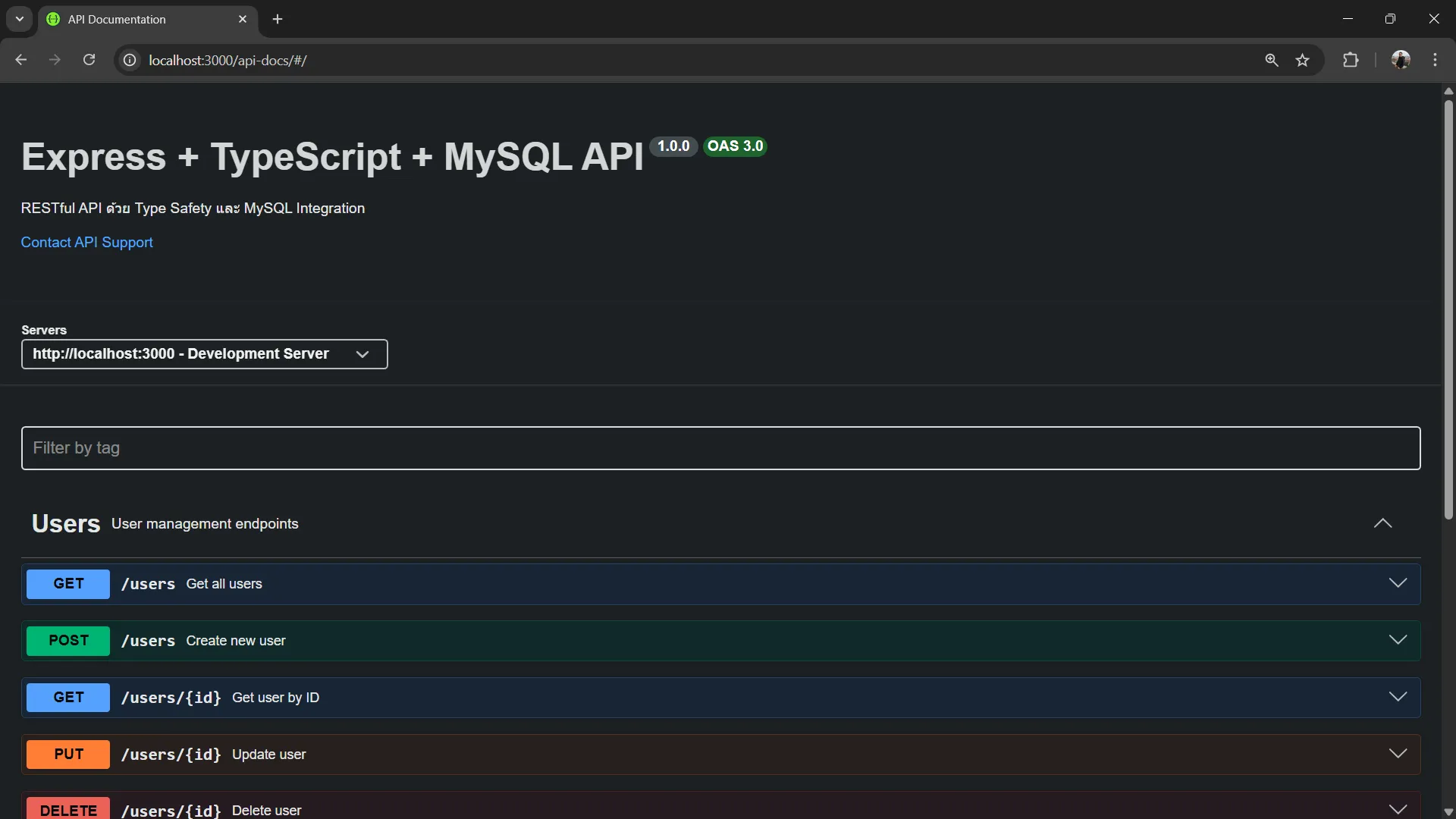
จะเห็นหน้า API Documentation แบบ Interactive ที่สามารถ:
- ดู Endpoint ทั้งหมด
- ดู Request/Response Schemas
- ทดสอบ API โดยตรงในหน้าเว็บ
11.3 ทดสอบผ่าน Swagger UI#
เปิด Swagger UI ที่ http://localhost:3000/api-docs แล้วทดสอบทุก Endpoint ได้ดังนี้:
1. GET /users - ดึงข้อมูล Users ทั้งหมด
- คลิกที่
GET /users - คลิก
Try it out - ใส่
page= 1,limit= 10 - คลิก
Execute
ผลลัพธ์:
{
  "success": true,
  "data": [
    {
      "id": 1,
      "fname": "Karn",
      "lname": "Yong",
      "username": "karn.yong",
      "email": "karn@example.com",
      "avatar": "https://www.melivecode.com/users/1.png",
      "role": "user",
      "isActive": true,
      "created_at": "2026-04-21T10:00:00.000Z"
    },
    {
      "id": 2,
      "fname": "Ivy",
      "lname": "Cal",
      "username": "ivy.cal",
      "email": "ivy@example.com",
      "avatar": "https://www.melivecode.com/users/2.png",
      "role": "admin",
      "isActive": true,
      "created_at": "2026-04-21T10:00:00.000Z"
    }
  ],
  "pagination": {
    "page": 1,
    "limit": 10,
    "total": 3,
    "totalPages": 1
  }
}2. GET /users/{id} - ดึงข้อมูล User ตาม ID
- คลิกที่
GET /users/{id} - คลิก
Try it out - ใส่
id= 1 - คลิก
Execute
ผลลัพธ์:
{
  "success": true,
  "data": {
    "id": 1,
    "fname": "Karn",
    "lname": "Yong",
    "username": "karn.yong",
    "email": "karn@example.com",
    "avatar": "https://www.melivecode.com/users/1.png",
    "role": "user",
    "isActive": true,
    "created_at": "2026-04-21T10:00:00.000Z"
  }
}3. POST /users - สร้าง User ใหม่
- คลิกที่
POST /users - คลิก
Try it out - กรอกข้อมูล:
{
  "fname": "Test",
  "lname": "User",
  "username": "test.user",
  "email": "test@example.com",
  "avatar": "https://www.melivecode.com/users/99.png",
  "role": "user"
}- คลิก
Execute
ผลลัพธ์:
{
  "success": true,
  "data": {
    "id": 4,
    "fname": "Test",
    "lname": "User",
    "username": "test.user",
    "email": "test@example.com",
    "avatar": "https://www.melivecode.com/users/99.png",
    "role": "user",
    "isActive": true,
    "created_at": "2026-04-21T11:30:00.000Z"
  },
  "message": "User created successfully"
}4. PUT /users/{id} - อัปเดต User
- คลิกที่
PUT /users/{id} - คลิก
Try it out - ใส่
id= 1 - กรอกข้อมูล:
{
  "fname": "Karn",
  "lname": "Yong",
  "role": "admin"
}- คลิก
Execute
ผลลัพธ์:
{
  "success": true,
  "data": {
    "id": 1,
    "fname": "Karn",
    "lname": "Yong",
    "username": "karn.yong",
    "email": "karn@example.com",
    "avatar": "https://www.melivecode.com/users/1.png",
    "role": "admin",
    "isActive": true,
    "created_at": "2026-04-21T10:00:00.000Z"
  },
  "message": "User updated successfully"
}5. DELETE /users/{id} - ลบ User
- คลิกที่
DELETE /users/{id} - คลิก
Try it out - ใส่
id= 4 - คลิก
Execute
ผลลัพธ์:
{
  "success": true,
  "message": "User deleted successfully"
}ทดสอบ Search:
- คลิกที่
GET /users - คลิก
Try it out - ใส่
search= “karn” - คลิก
Execute
จะเห็นผลลัพธ์ที่มีเฉพาะ users ที่มีชื่อ “karn”
12. ทดสอบ Validation Errors#
12.1 ทดสอบผ่าน Swagger UI#
เปิด Swagger UI ที่ http://localhost:3000/api-docs แล้วทดสอบ Validation Errors ได้ดังนี้:
ทดสอบ 1: Email ไม่ถูกต้อง
- คลิกที่
POST /users - คลิก
Try it out - กรอกข้อมูลที่ email ผิดรูปแบบ:
{
  "fname": "Karn",
  "lname": "Yong",
  "username": "karn.yong",
  "email": "invalid-email"
}- คลิก
Execute
ผลลัพธ์:
{
  "success": false,
  "errors": [
    {
      "message": "Invalid email format"
    }
  ]
}ทดสอบ 2: Username น้อยเกินไป
- คลิกที่
POST /users - คลิก
Try it out - กรอกข้อมูลที่ username น้อยเกินไป:
{
  "fname": "Karn",
  "lname": "Yong",
  "username": "ab",
  "email": "karn@example.com"
}- คลิก
Execute
ผลลัพธ์:
{
  "success": false,
  "errors": [
    {
      "message": "Username must be 3-50 characters and contain only letters, numbers, and underscores"
    }
  ]
}ทดสอบ 3: ข้อมูลไม่ครบ
- คลิกที่
POST /users - คลิก
Try it out - กรอกเฉพาะ fname:
{
  "fname": "Karn"
}- คลิก
Execute
ผลลัพธ์:
{
  "success": false,
  "errors": [
    {
      "message": "Last name is required"
    },
    {
      "message": "Username is required"
    },
    {
      "message": "Email is required"
    }
  ]
}ทดสอบ 4: Role ไม่ถูกต้อง
- คลิกที่
POST /users - คลิก
Try it out - กรอกข้อมูลที่ role ผิด:
{
  "fname": "Karn",
  "lname": "Yong",
  "username": "karn.yong",
  "email": "karn@example.com",
  "role": "superadmin"
}- คลิก
Execute
ผลลัพธ์:
{
  "success": false,
  "errors": [
    {
      "message": "Role must be either \"user\" or \"admin\""
    }
  ]
}ทดสอบ 5: GET /users ด้วย page ที่ผิด
- คลิกที่
GET /users - คลิก
Try it out - กรอก
page=-1 - คลิก
Execute
ผลลัพธ์:
{
  "success": false,
  "errors": [
    {
      "message": "Page must be a positive number"
    }
  ]
}ทดสอบ 6: GET /users/:id ด้วย id ที่ผิด
- คลิกที่
GET /users/{id} - คลิก
Try it out - กรอก
id=abc - คลิก
Execute
ผลลัพธ์:
{
  "success": false,
  "errors": [
    {
      "message": "ID must be a positive number"
    }
  ]
}13. ประโยชน์ของการใช้ TypeScript + MySQL + OpenAPI#
13.1 Type Safety#
- TypeScript ช่วยจับข้อผิดพลาดตั้งแต่ขั้นตอน development
- Interfaces และ Types ช่วยกำหนดรูปแบบข้อมูลที่ชัดเจน
- IntelliSense และ Auto-complete ช่วยให้เขียนโค้ดได้เร็วขึ้น
13.2 Runtime Validation#
- Validation middleware ตรวจสอบข้อมูลที่รับมาจาก client
- Error messages ที่ชัดเจน
- ป้องกัน invalid data เข้าสู่ระบบ
13.3 API Documentation#
- OpenAPI spec ที่เป็นมาตรฐาน
- Swagger UI แสดง documentation แบบ interactive
- ช่วย frontend developers เข้าใจ API ได้ง่าย
14. Best Practices#
✅ สิ่งที่ควรทำ:
- กำหนด Types/Interfaces แยกจาก routes
- ใช้ TypeScript strict mode
- จัดการ errors อย่างสมบูรณ์
- เขียน OpenAPI specs ที่ชัดเจน
- ใช้ environment variables สำหรับ config
- Validations ทั้ง input และ output
- ใช้ Prepared Statements สำหรับ SQL (ป้องกัน SQL Injection)
❌ สิ่งที่ควรหลีกเลี่ยง:
- ไม่ใส่ validation
- Hard-code values
- ไม่จัดการ errors
- ไม่อัปเดต API docs
- SQL Injection vulnerabilities
15. สรุป#
บทความนี้ครอบคลุม:
- ✅ การตั้งค่า Express + TypeScript อย่างถูกต้อง
- ✅ การตั้งค่า MySQL ด้วย CAMPP สำหรับ Local Development
- ✅ TypeScript Types สำหรับ Type Safety
- ✅ Input Validation ด้วย Middleware
- ✅ OpenAPI Specification สำหรับ API Documentation
- ✅ Swagger UI สำหรับ Interactive API Testing
- ✅ CRUD Operations กับ MySQL ด้วย mysql2
การรวมเทคโนโลยีเหล่านี้เข้าด้วยกันจะได้ API ที่:
- ปลอดภัยด้วย Type Safety
- ตรวจสอบข้อมูลอัตโนมัติ
- มี Documentation ที่ชัดเจน
- เชื่อมต่อกับ MySQL Database ได้จริง
- พัฒนาและบำรุงรักษาได้ง่าย
แหล่งการเรียนรู้#
- TypeScript Handbook ↗: เอกสาร TypeScript
- Express.js ↗: เอกสาร Express
- mysql2 ↗: MySQL Client สำหรับ Node.js
- CAMPP ↗: Local Web Development Stack
- OpenAPI Specification ↗: มาตรฐาน OpenAPI
- Swagger UI ↗: เอกสาร Swagger UI